
Have you ever posted a photo or Reel and had someone ask, “Where did you get that?” These questions can tell you a lot about what your audience actually wants to buy. Creator storefront ideas can help you turn those everyday recommendations into simple, useful collections, whether you want to share your favourite products, build a budget-friendly list, or recreate a setup your followers loved. Here are 25 ideas you can try based on your niche and audience.
What Makes a Creator Storefront Idea Actually Useful?
Before adding products, think about the reason someone would visit that collection.
Are they trying to solve a problem? Recreate something they saw in your content? Find a product within a certain budget? Prepare for an event? Or simply discover products you use?
A strong storefront idea usually has four things:
A clear audience need
A specific shopping context
Products that fit the context
A connection to your existing content
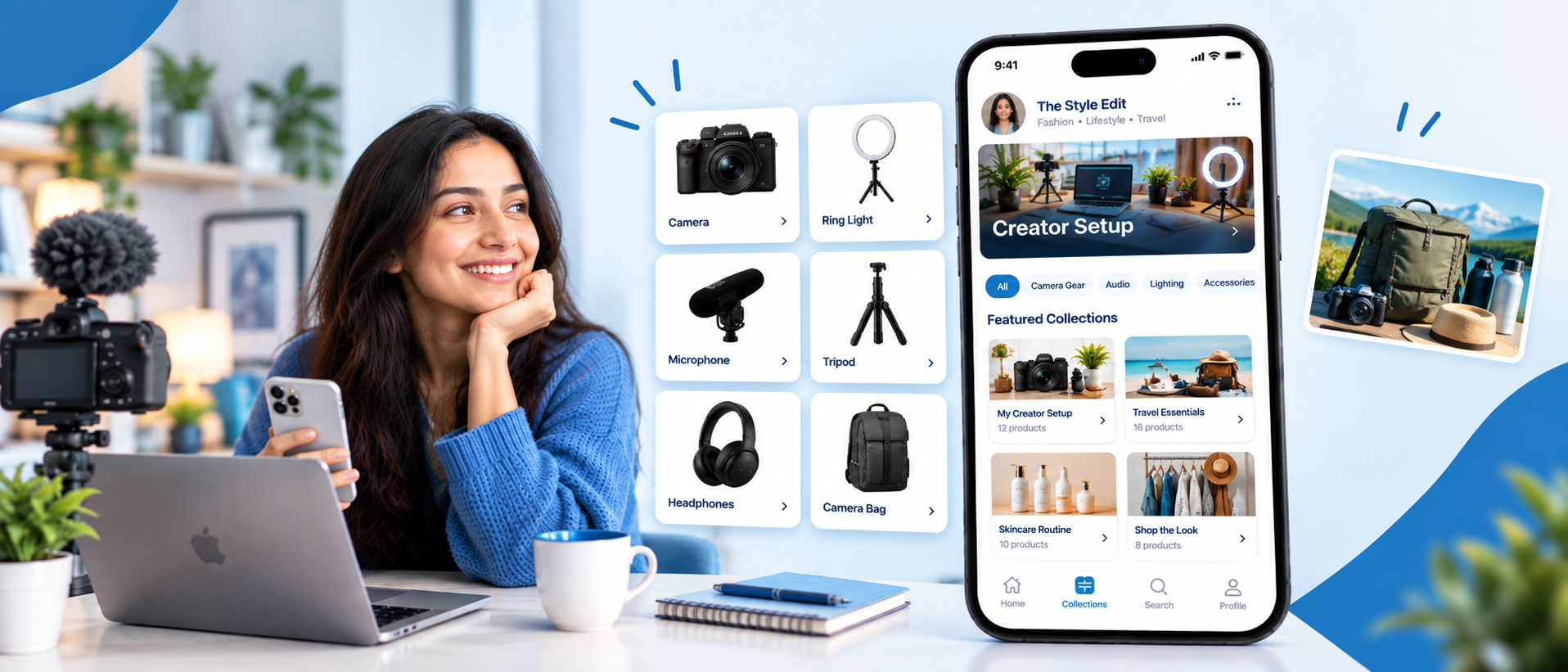
For example, “Tech Products” is broad.
“My Desk Setup for Creating YouTube Videos” is much more specific.
The second collection tells a follower what they will find, why it exists, and whether it is relevant to them before they even open it.
25 Creator Storefront Ideas
1. Recreate My Setup
Instead of simply listing the products you use, recreate a complete setup your followers can understand.
This could be your desk, filming corner, gym bag, travel kit, makeup station, gaming setup, or home office.
Break the collection into the products that make the setup work.
For a creator, that could include a phone stand, microphone, lighting, tripod, desk accessories, and headphones. A fitness creator could create a similar collection around their home workout setup.
Content idea: “Want to recreate my setup? Everything is here.”
This works well when followers already ask about several products appearing together in your content.
2. Products From My Most-Asked Reel
Look at your comments and DMs.
Which Reel repeatedly generates questions about a product?
Build a collection around that content instead of creating a generic product list.
If one Reel about your morning routine gets repeated questions about the products you use, create a collection specifically for that routine.
The collection works because it answers a question your audience has already asked.
3. Start Here: My 5 Most-Recommended Products
New visitors should not have to explore your entire storefront to understand your recommendations.
Create a small “Start Here” collection featuring the products you recommend most often.
Keep it selective. If you are unsure how to choose, this guide on curating products your audience will actually buy can help. Five useful recommendations can be more helpful than 50 products competing for attention.
For every product, be prepared to explain what you like about it, who it suits, and when you would not recommend it.
That last part can make the recommendation feel more credible.
4. Beginner Kit for My Niche
Beginners often do not know where to start.
Turn that problem into a storefront collection.
A photography creator could create a beginner photography kit. A beauty creator could create a beginner makeup kit. A fitness creator could create beginner gym essentials. A creator educator could curate basic content creation equipment.
Avoid adding advanced products simply because they are more expensive.
The purpose of this collection is to reduce the number of decisions a beginner has to make.
5. Upgrade Your Current Setup
Not every follower needs a complete setup.
Some already own basic equipment and want to improve one part of it.
Create an upgrade-focused collection with products that solve common limitations.
For example:
Better lighting
Better audio
More comfortable desk accessories
Improved phone photography
Better storage
Travel-friendly equipment
This gives you a natural content angle too:
“If your current setup looks like this, these are the upgrades I would consider first.”
6. What I Use for a Full Day of Content
Show followers the products that actually stay with you throughout your content workflow.
For example:
Morning → planning → filming → editing → publishing.
You can include your notebook, phone, laptop accessories, microphone, headphones, lighting, power bank, or other relevant products.
This is stronger than simply saying “My creator favorites” because it gives every product a place in a real routine.
7. One Problem, Five Products
Choose one specific problem your audience has and curate only products that help solve it.
Examples:
Small desk, limited storage
Messy travel bag
Difficult phone filming
Unorganized skincare
Limited kitchen space
Beginner workout setup
The collection becomes a solution rather than a catalogue.
You can also create a Reel explaining the problem first and send viewers directly to the related collection.
8. My “Would Buy Again” Collection
This is one of the most personal storefront concepts.
Instead of recommending everything you have ever purchased, focus on products you would personally spend money on again.
That distinction matters.
You can explain:
What you bought
How long you have used it
What you like
What could be better
Whether you would purchase it again
Google recommends that product recommendations and reviews demonstrate relevant knowledge and, where possible, support claims with evidence of first-hand experience. Google Search Central's guidance on writing high-quality reviews is useful when building this kind of recommendation content.
Your own experience becomes the reason the collection exists.
9. Products I Wish I Bought Earlier
Think about purchases that made your routine easier after you discovered them.
This could work for almost any niche.
A creator might recommend a better microphone. A traveller might recommend packing cubes. A home creator might recommend an organization product. A student creator might recommend a useful desk accessory.
The storytelling angle is naturally stronger than a standard product list.
Content idea: “I wish I had bought these sooner.”
10. My Content Creation Bag
Creators can turn the contents of their actual bag into a storefront collection.
Depending on your work, it might include:
Phone
Portable microphone
Power bank
Charger
Tripod
Memory card
Portable light
Notebook
Storage accessories
Film a “What’s in my creator bag?” video and connect it to the collection.
This creates a direct connection between content discovery and shopping.
11. Under ₹500: Useful Finds
Budget collections work best when the products have a clear purpose.
Instead of filling a collection with anything under ₹500, select useful products that fit your niche.
You could create:
Creator finds under ₹500
Beauty finds under ₹500
Home finds under ₹500
Student finds under ₹500
Travel finds under ₹500
The price limit gives followers an immediate reason to explore.
Just remember that prices and availability can change, so refresh the collection regularly.
12. Budget vs Premium: Which One Should You Pick?
Instead of creating another simple price-based list, use this collection to help followers understand the trade-off between options.
For example, a creator could show:
A budget microphone for casual use
A mid-range microphone for regular content
A premium microphone for creators who need better audio control
The purpose is not simply to show three prices. Explain what changes as someone moves from one option to another.
This makes the collection useful for followers who know what they want but are unsure how much they need to spend.
13. Shop the Look
Fashion and lifestyle creators can turn an outfit into a complete shopping collection.
Instead of sharing one clothing item, include the relevant pieces:
Top
Bottom
Shoes
Bag
Accessories
You can also create collections for specific occasions such as office wear, casual outings, weddings, festivals, or travel.
The key is to make the collection visually and contextually connected to the original content.
14. My Routine, Product by Product
Routine-based collections work well for beauty, fitness, productivity, food, and lifestyle creators.
Take one routine and break it into the products involved.
For example:
Morning skincare routine
Cleanser
Moisturizer
Sunscreen
Or:
My morning work routine
Planner
Desk accessories
Laptop stand
Coffee equipment
Followers are not just seeing products. They are seeing how those products fit into your life.
15. My Travel Kit for [Type of Trip]
Avoid making every travel collection “Travel Essentials.”
Make the trip itself the organizing principle.
Examples:
Weekend trip
Beach vacation
Business travel
Road trip
International travel
Budget travel
Monsoon travel
A follower preparing for a specific trip can immediately understand which collection is relevant to them.
16. Gifts I Would Actually Give
Gift collections become more useful when they reflect your personal judgment.
Instead of listing hundreds of gift products, create smaller collections around the recipient:
Gifts for creators
Gifts for students
Gifts for travellers
Gifts for your best friend
Gifts for someone who loves fitness
Gifts for someone who loves tech
You can also divide them by budget.
Explain why each product made your list.
17. Seasonal Edit
A storefront should change with your audience's current needs.
Create collections around:
Summer
Monsoon
Winter
Festival season
Back-to-college season
Wedding season
Holiday travel
Seasonal collections also give you a natural reason to create fresh content and bring followers back to your storefront.
18. My Festival Shopping Edit
For creators with an Indian audience, festival-specific collections can be especially relevant.
Depending on your niche, this could include:
Fashion
Beauty
Home decoration
Gifts
Kitchen products
Electronics
Accessories
Do not make the collection too broad.
Choose one festival and one audience need at a time.
For example, “Diwali Home Refresh” is more specific than “Diwali Products.”
19. Products for Your First [Niche Goal]
Help followers who are taking their first step toward a specific goal.
Examples:
First home gym
First YouTube setup
First solo trip
First office setup
First skincare routine
First camera kit
This idea works because the follower is already motivated by a goal.
Your storefront simply helps them decide what they need to get started.
20. My Content-to-Product Collection
Turn individual pieces of content into permanent shopping resources.
If you publish a video about your filming setup, create a “Filming Setup” collection. If you want a step-by-step process for building one, see how to create the perfect product collection for your niche.
If you publish a Reel about your travel packing list, create a “Travel Packing” collection.
If you publish a makeup tutorial, create a “Products Used in This Look” collection.
This creates a repeatable system:
Content → Product interest → Specific collection → Product discovery
You are no longer asking every follower to search your old content for a product link.
YouTube's official Shopping guidance follows a similar content-to-product approach, allowing eligible creators to organize recommended products into themed collections and surface those collections through places such as channel stores and video descriptions. See YouTube's Shopping collections guidance.
21. Followers Chose These
Let your audience influence the collection.
Use Instagram polls, Stories, comments, community posts, or Q&A sessions to find out what your followers actually want.
For example:
“Which products should I add to my storefront?”
Then create a collection around the most requested category.
This approach also gives you content before the collection is even published.
You can document the process:
“You asked for it, so I made the collection.”
22. My Honest Alternatives
Some followers do not need your top pick. They need the option that suits their situation.
Create a collection where the same need is solved in different ways, based on use case rather than price:
Good for small spaces
Good for travel
Good for beginners
Good for daily use
For example, you could show three portable lights: a compact one for travel, a larger one for a fixed desk, and a simple one for beginners. Explain who each one suits and when you would skip it.
23. Viral Product, Tested by Me
Trending products can create interest, but popularity alone should not determine what you recommend.
If you have actually used a trending product, create a collection around it and explain your experience.
Cover:
What the product claims to do
What happened when you used it
Who may find it useful
What you did not like
Whether you would buy it again
This gives your recommendation something that a generic product description cannot provide: creator experience.
Google's review guidance also recommends focusing on original analysis, first-hand evidence, benefits and drawbacks, and decision-making factors rather than simply repeating a manufacturer's product description.
24. My “Don't Buy Everything” Collection
This is a different kind of storefront idea.
Instead of encouraging followers to buy more, help them decide what they actually need.
For example:
“You don't need all of this. Start with these three.”
You can show the essential product first and optional upgrades afterward.
This may sound counterintuitive for a shopping-focused page, but useful curation can strengthen trust. Your job as a creator is not to make the biggest catalogue. It is to help followers make better decisions.
25. My Personal Shopping Guide
Finally, build one collection that represents your overall recommendation philosophy.
This can become the main collection for new visitors.
Organize it around the products you personally stand behind and update it over time.
You can divide it into:
Products I use
Products I recommend
Budget alternatives
Recent discoveries
Seasonal favorites
Think of this collection as your personal shopping guide rather than a complete inventory of everything you have ever recommended.
How to Choose the Right Creator Storefront Ideas for Your Niche
You do not need all 25 ideas.
Start with the ones that naturally match your content.
1. Beauty Creators
Start with:
My routine
Products I actually use
Shop the look
Budget beauty picks
Viral products tested by me
2. Fashion Creators
Start with:
Shop the look
Seasonal edit
Festival shopping edit
Gifts
Budget fashion picks
3. Tech Creators
Start with:
Recreate my setup
Beginner kit
Upgrade your setup
Content creation bag
Honest alternatives
4. Fitness Creators
Start with:
Beginner fitness kit
My workout setup
Products I use
Goal-specific collections
Budget fitness picks
5. Travel Creators
Start with:
Travel kit
Trip-specific collections
Packing essentials
Products I wish I bought earlier
Budget travel picks
6. Home & Decor Creators
Start with:
Recreate my room setup
Small-space solutions
Home organization picks
Seasonal home refresh
Decor under a specific budget
7. Food Creators
Start with:
My kitchen essentials
Tools I use regularly
Beginner cooking kit
Baking essentials
Products for a specific recipe or cooking style
8. Parenting Creators
Start with:
New-parent essentials
Travel products for kids
Everyday organization
Products I wish I had earlier
Budget-friendly family finds
The strongest starting point is usually the collection that answers a question your followers are already asking.
How to Connect Your Content With Your Storefront
A storefront should not operate separately from your content.
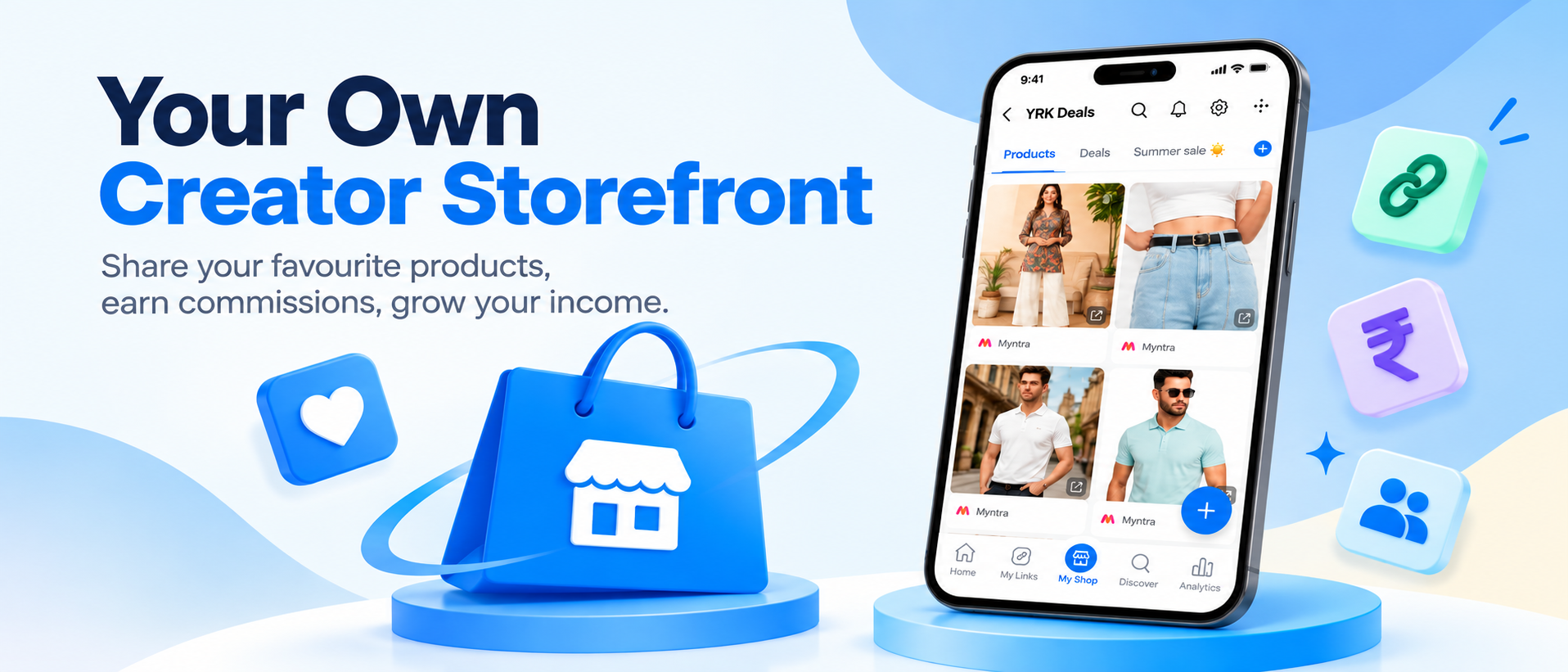
Suppose you post a Reel showing your creator setup.
Do not simply say:
“Link in bio.”
Give the follower a reason to click:
“I put every product from my setup in one collection. You can find it through the link in my bio.”
The same principle works for YouTube descriptions, Stories, WhatsApp, Telegram, and other channels. If you are new to linking products from short videos, here is how shoppable links work on Instagram Reels.
YouTube also supports product discovery through video descriptions and other shopping surfaces for eligible creators, showing why the connection between content and specific products can reduce the steps between discovery and shopping. See YouTube's official product-shopping guidance.
For example:
Content: “My ₹5,000 creator setup”
Storefront collection: “Creator Setup Under ₹5,000”
Or:
Content: “What I pack for a weekend trip”
Storefront collection: “My Weekend Travel Kit”
The closer the storefront collection is to the content that created the interest, the less work the follower has to do to find the product.
How to Make Your Creator Storefront More Helpful
Add Your Own Context
Do not simply repeat the retailer's product title.
Tell followers something they cannot get from a basic product listing.
Explain:
Why you chose it
Who it is for
How you use it
What you like about it
What limitation you noticed
Whether a cheaper option may be enough
Google's people-first content guidance emphasizes first-hand expertise and content that adds useful information rather than simply summarizing what is already available elsewhere. Read Google's people-first content guidance.
That is where your value as a creator comes from.
Your followers already have access to product specifications. They follow you because they want your judgment.
Keep Collections Specific
“Everything I Love” can become difficult to navigate when it contains 100 products.
“Everything I Use for Travel” gives visitors a much clearer starting point.
Specific collections also make it easier to promote individual storefront sections through specific content.
Do Not Add Products Just to Make the Storefront Look Full
A large product catalogue is not automatically a better storefront.
If you have not used a product, cannot explain why it belongs there, and would not recommend it to someone who asked you personally, think twice before adding it.
Review Your Storefront Regularly
Product availability, prices, trends, and your audience's interests can change.
Review your collections periodically and:
Remove products that are no longer relevant
Replace unavailable products
Add useful discoveries
Refresh seasonal collections
Reorder your most useful recommendations
Watch What Your Audience Clicks
If your storefront analytics show that followers repeatedly click one category, treat that as feedback. You may discover that your audience is more interested in creator equipment than you expected, or that a particular type of budget product gets significantly more attention. Use those signals to decide which collection to build next and which content to create around it.
How Zokera Fits Into a Creator Storefront Strategy
Zokera lets you build a creator storefront and organize your recommendations into collections, so each piece of content can point to a specific shopping destination instead of a generic product list.
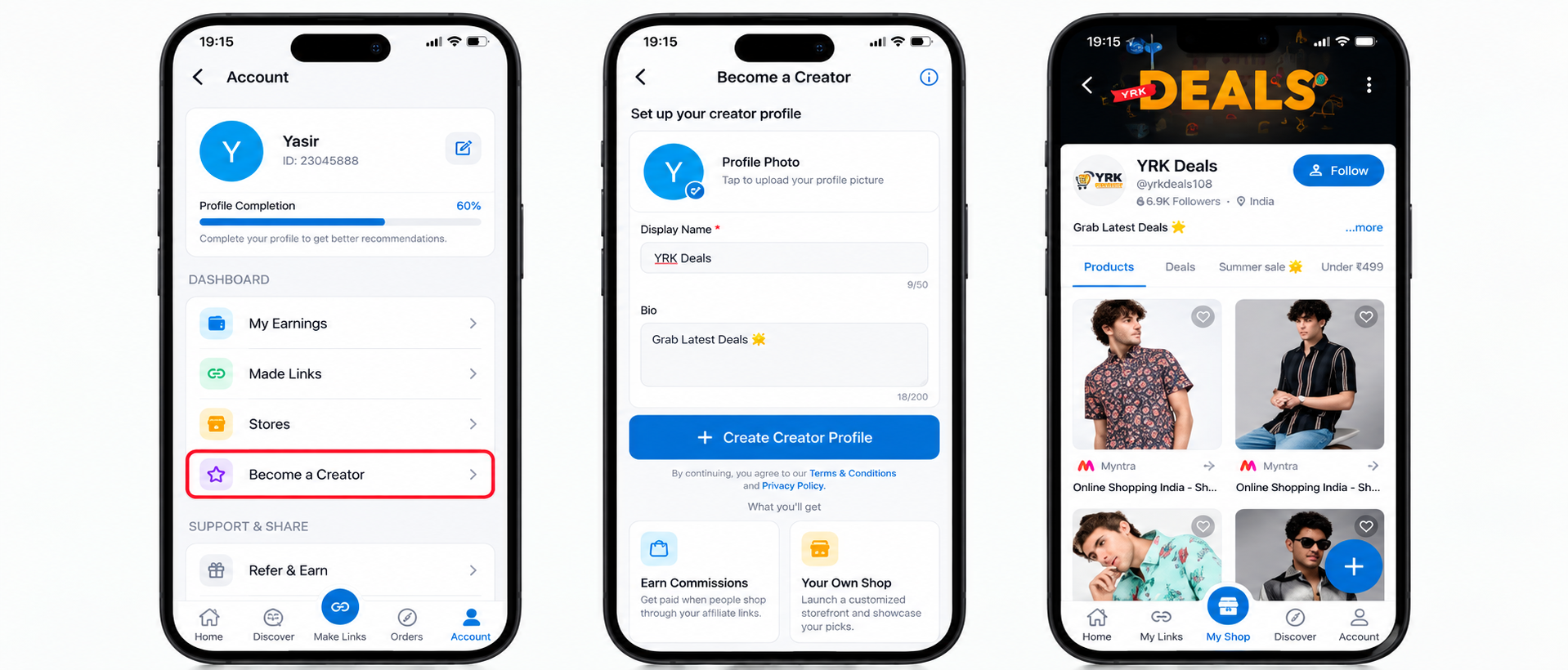
The real decision is what belongs inside it and why. Here is what you have to work with:
Products from 1100+ brand partnerships to curate from
Collections to group products by routine, budget, occasion, or content theme
One storefront link you can share on Instagram, YouTube, WhatsApp, and Telegram
Auto-DM to send the relevant product link when a follower asks for it
Cashback on eligible purchases made through your storefront, which gives you one more reason to invite followers to shop your recommendations
This is where the collection ideas above pay off. Instead of sending followers to a general product page, you can send them to the exact collection that matches the Reel or video they just watched. Once your storefront is live, how to sell more products on Zokera covers what to do next, and the creator commerce platform in India explains the wider model.
If you promote products through paid partnerships, free products, or other material connections, make the relationship clear to your audience. In India, ASCI's influencer advertising guidelines require advertisements published by influencers to carry a disclosure label that clearly identifies them as advertisements, where there is a material connection with the brand. This is general information, not legal advice.
Ready to build yours? Create your Zokera storefront.
Common Creator Storefront Mistakes
1. Creating Collections That Are Too Broad
“Products I Like” does not tell a new visitor much.
Give collections a specific purpose.
2. Adding Products You Cannot Explain
If you cannot answer why you recommend a product, it probably should not be a priority recommendation.
3. Copying Another Creator's Storefront
Your storefront should reflect your audience, not someone else's.
Two creators in the same niche can have completely different audiences and shopping needs.
4. Promoting the Entire Storefront Every Time
Sometimes the best destination is your entire storefront.
Sometimes it is one specific collection.
If a Reel is about your travel bag, sending someone to a general storefront creates unnecessary browsing. A travel collection is more relevant.
5. Ignoring the Follow-Up Content
Do not create a collection once and forget about it.
Use the products inside your collections as inspiration for future tutorials, comparisons, reviews, routines, and shopping guides.
Conclusion
A good creator storefront does not need to be packed with products. It just needs to make it easier for your followers to find things that are genuinely useful to them. Start with the products people already ask you about, group them into clear collections, and add your own context wherever it helps.
The right creator storefront ideas can turn your everyday content and recommendations into a simple shopping experience that feels helpful rather than pushy. As you learn what your audience clicks, saves, and buys, you can keep refining your storefront around what they actually care about.
FAQs About Creator Storefront Ideas
1. What are the best creator storefront ideas?
The most useful creator storefront ideas are specific to your audience and content. Examples include beginner kits, creator setups, products from your most-asked content, budget collections, routine-based collections, travel kits, gift guides, seasonal edits, and products you personally use.
2. How many products should I add to a creator storefront?
There is no fixed number that works for every creator. Start with enough products to make each collection useful, but avoid adding unrelated products simply to make the storefront look larger. Curated recommendations are easier to browse than an overcrowded catalogue.
3. What should I put in my creator storefront?
Start with products you use, understand, or can confidently recommend to your audience. Then organize them around specific needs, routines, budgets, occasions, or content themes.
4. How can I turn followers into buyers with a creator storefront?
Connect your content with specific shopping collections, the same way you would convert Instagram followers into customers. When a follower sees a product in your Reel, video, Story, or post, make it easy for them to find that exact recommendation. Add useful context about the product instead of relying only on a product title or generic sales message.
5. Should I create separate collections for different budgets?
Yes, when your audience has different spending levels. Collections such as “Under ₹500” or “Budget vs Premium” can help followers narrow their choices, provided the products remain relevant to the same shopping need.
6. How often should I update my creator storefront?
Review it regularly rather than waiting for a problem. Remove unavailable or outdated products, refresh seasonal collections, and add products that fit your current content and audience interests.
7. Can small creators use these storefront ideas?
Yes. You do not need a huge product catalogue to start. A small creator can build a focused storefront around products their audience already asks about. In many cases, a highly relevant collection is more useful than a large general catalogue.
8. Should every product in my storefront be something I personally use?
Personal experience is what makes a recommendation credible, but the exact requirement depends on your recommendation model. If you have not used a product, say so, and disclose paid or otherwise connected promotions as required in your market.
Comments (0)
Be the first to comment.