
.png&w=3840&q=75)
You've set up your Zokera storefront. You've added products. But somehow, your followers are not clicking, not buying, and not converting the way you hoped.
Sound familiar? Here's what most creators miss: it's not about how many products you add. It's about how you organize them.
That's exactly where Zokera Collections come in. If you want to know how to sell more products on Zokera, collections are your single biggest lever. They make your storefront look curated, feel personal, and work harder, even while you sleep.
In this blog, we'll break down what Zokera Collections are, how they work for beginners and seasoned creators alike, and how you can use them strategically to boost your sales starting today.
What Are Zokera Collections?
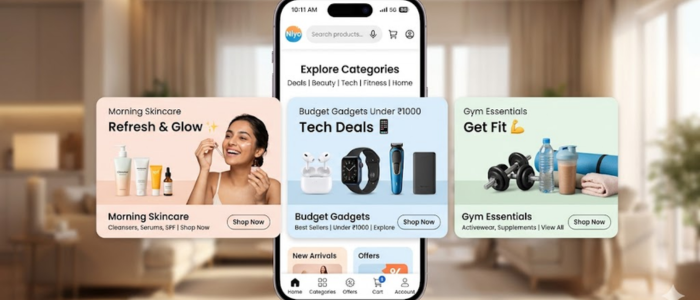
Zokera Collections are curated product groups that you create inside your Zokera storefront. Think of them as themed shelves in your store. Instead of showing your followers a random list of 50 products, you organize them into neat, purposeful groups.
For example:
"My Morning Skincare Routine": with all the products you actually use every day
"Best Budget Gadgets Under ₹1000": perfect for your value-conscious audience
"Gifts for Her": great for festive season traffic
"My Gym Essentials": for your fitness-focused followers
Each collection tells a story. And when your audience feels like you're speaking directly to their interest or need, they're far more likely to click and buy.
ALSO READ: What Is Zokera and How Does It Work?
Why Collections Are a Game-Changer for Indian Creators
India's creator economy is booming, but attention spans are short. Your followers scroll fast. If your storefront looks cluttered or random, they'll leave before even browsing.
Collections solve this problem in three important ways:
1. They Create Context
A product on its own is just a product. But a product inside a collection called "My Daily Haircare Routine" suddenly has a story. Your follower thinks, "Oh, this is what she actually uses." That trust drives action.
2. They Match Buyer Intent
Different followers come to your page with different needs. Someone looking for gift ideas doesn't want to scroll through your gym equipment. Collections let you segment your products so every type of visitor finds exactly what they're looking for fast.
3. They Work Across Platforms
Whether you're sharing on Instagram, YouTube, or WhatsApp, you can drop a specific collection link. Instead of sending someone to your full storefront and hoping they find the right product, you send them directly to the collection that matches your content. Targeted links = higher conversions.
How to Set Up Collections on Zokera (Step-by-Step)
Setting up collections on Zokera is simple; you don't need to be a tech wizard.
Step 1: Log in to your Zokera dashboard
Head over to your creator account and open the storefront section.
Step 2: Go to "Collections."
Look for the Collections tab in your dashboard. This is where you'll create and manage all your curated groups.
Step 3: Create a new collection
Click on "Create Collection" and give it a clear, searchable name. Be specific, "Best Skincare Products 2024" works better than just "Skincare".
Step 4: Add products to your collection
Browse through Zokera's 1000+ brand partnerships and add the products that fit your collection theme. You can mix and match across categories as long as they serve the same audience need.
Step 5: Customize and publish
Add a cover image, a short description, and arrange products in the order you want them to appear. Then hit publish your collection is live.
Step 6: Share the collection link
Copy the unique link for your collection and share it in your Instagram bio, Stories, YouTube description, or WhatsApp broadcast.
That's it. Simple, fast, and powerful.
ALSO READ: How to Get Brand Collaborations as a Small Creator in 2026
Collection Strategies That Help You Sell More Products on Zokera

Knowing how to create collections is step one. Knowing which collections to create is where the real magic happens.
Here are proven collection strategies that top Zokera creators use:
Seasonal & Festive Collections
During Diwali, Holi, Valentine's Day, and the New Year, Indian shoppers spend heavily during festive seasons. Create a dedicated collection for each festival well in advance. Label them clearly: "Diwali Gift Guide 2024" or "Valentine's Day Picks Under ₹500".
Festive collections drive urgency. When your follower sees a time-relevant collection, they're more motivated to buy now rather than later.
Routine-Based Collections
Share your actual daily routines with your audience and back them with products. Morning routine. Workout routine. Nighttime skincare routine. Work-from-home setup.
Routine-based collections feel authentic because they are authentic. They position you as a trusted friend recommending products you genuinely use, not just any random affiliate pushing links. And as a bonus, your followers (who become shoppers) also earn cashback on every purchase made through your Zokera storefront, which makes them more likely to buy and come back.
Budget-Based Collections
Price sensitivity is real in India. Create collections like:
"Best Products Under ₹500."
"Premium Picks Worth Every Rupee"
"Best Value for Students"
These collections serve a specific audience need and often see high engagement because they answer a question your followers already have in their heads.
Niche & Content-Linked Collections
If you just posted a YouTube video about your home office setup, create a matching "My Work From Home Essentials" collection and link it in the description. If you posted an Instagram Reel about budget fashion finds, link to an "Affordable Style Picks" collection in your bio.
Your content and your collections should work as a system. One drives attention, the other drives sales.
How Zokera Collections Support Brand Collaborations
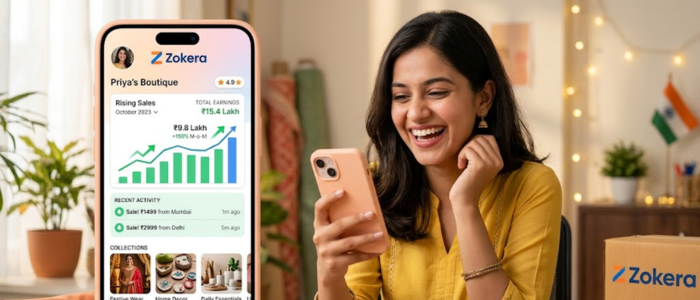
If you're a creator looking to land brand deals, your collections are actually a portfolio.
When brands check out your Zokera storefront, they want to see that you're organized, strategic, and serious. A creator with five well-curated, themed collections signals professionalism. It shows the brand that you understand product marketing, not just content creation.
Zokera's platform is built for this. With 1000+ brand partnerships already live on the platform, you have a massive catalogue to build niche collections from. And when your storefront converts well (which it will, with good collections), you'll have real data to show brands when negotiating collaboration deals.
Even if you're a beginner with a small following, a neatly organized storefront with strong collections can open doors that raw follower count alone won't.
The One Mistake Creators Make With Their Storefronts
Most creators add products and forget about them. Their storefront becomes a dumping ground of 80 random products with no structure, no story, no reason for a visitor to stay.
Collections fix this. They turn your storefront from a catalogue into a curated shopping experience.
The creators who sell more products on Zokera aren't necessarily the ones with the biggest audiences. They're the ones who've put thought into the experience they're creating for their followers.
Start with three collections. That's it. Pick three themes that match your content niche, add 5–10 products each, write a short description, and publish. Then watch your click-through and conversion rates improve.
Conclusion
If you've been wondering how to sell more products on Zokera, the answer is simpler than you think: organize with intention.
Zokera Collections gives you the tools to turn casual browsers into buyers, seasonal traffic into real income, and a generic storefront into a brand experience your followers actually love. Every purchase your followers make also earns them cashback, which keeps them coming back to your storefront again and again.
Whether you're just starting or looking to scale your creator income, collections are the upgrade your storefront needs.
👉 Set up your Zokera storefront today and create your first collection; your audience (and your earnings) will thank you.
ALSO READ:
- How to Set Up Your Zokera Creator Storefront in Minutes
- Zokera Auto-DM: Turn Every Instagram Comment Into a Sale
- Best Creator Commerce Platform in India 2026: Everything You Need to Know
- How to Make Money from Your Social Media Following in India
- How Instagram Influencers Can Monetize Using Zokera (2026)
FAQs: How Zokera Collections Help You Sell More Products
Q1. What is a collection on Zokera?
A collection is a curated group of products you organize on your Zokera storefront around a theme, like "Morning Skincare Routine" or "Gifts Under ₹500."
Q2. How do I create a collection on Zokera?
Log in to your Zokera dashboard → go to Collections → click "Create Collection" → add products → publish and share the link.
Q3. Does Zokera help creators sell more products?
Yes. With tools like Collections, Auto-DM, and a customizable storefront backed by 1000+ brand partnerships, Zokera is built to help creators monetize their audience effectively.
Q4. Can small creators use Zokera Collections?
Absolutely. Even with a small following, well-organized collections make your storefront look professional and convert better than a random product list.
Q5. Do followers earn anything when they buy from a Zokera storefront?
Yes, followers earn cashback on every purchase made through a creator's Zokera storefront.
Q6. Which products can I add to my Zokera Collections?
You can add any product from Zokera's 1000+ brand partnerships across categories like fashion, beauty, tech, fitness, and more.
Q7. How many collections should I have on my Zokera storefront?
Start with 3 to 5 collections. Keep them focused, relevant to your niche, and update them around festivals or new content.
Comments (0)
Be the first to comment.