
Losing your phone can be stressful, especially when it is linked to your bank account through UPI. Many people worry about money misuse and do not know what to do first. Knowing how to block UPI after phone lost can help you act quickly and stay safe. In this guide, you will learn simple and effective steps to block UPI, protect your money, and reactivate UPI safely on a new phone.
Why Blocking UPI After Phone Lost Is Very Important
When your phone is lost, your UPI apps may still be logged in. Even though UPI payments require a PIN, fraudsters can try different methods to misuse your account. In some cases, people store their PIN carelessly or use weak security settings.
Blocking UPI immediately helps you:
Prevent unauthorized money transfers
Protect your linked bank accounts
Avoid financial fraud and stress
Buy time until you get a new SIM or phone
UPI works through your mobile number linked to your bank account. If someone gets control of your SIM or phone, they may try to reset apps or trick customer care. That is why quick action is extremely important.
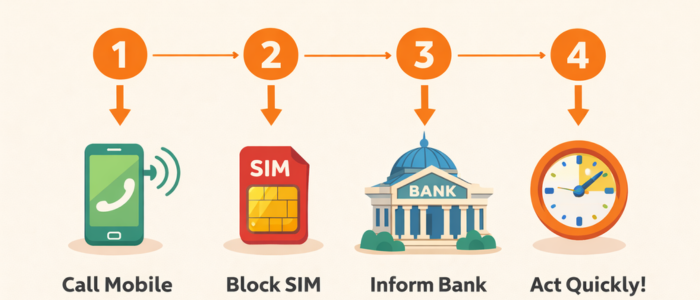
What to Do Immediately After Losing Your Phone
Before we go into the exact process of blocking UPI, let us understand the first urgent steps you must take. These steps should ideally be done within minutes or hours of losing your phone.
1. Stay Calm and Act Quickly
Panic leads to delay and mistakes. Take a deep breath and start taking action step by step. The faster you act, the safer your money will be.
2. Call Your Mobile Number From Another Phone
Try calling your lost phone. If someone answers, politely ask for its return. If the phone is switched off or unreachable, assume it is lost or stolen and proceed with blocking.
3. Block Your SIM Card Immediately
Your SIM card is the key to your UPI. Call your mobile network customer care (Jio, Airtel, Vi, BSNL) and request SIM blocking.
You will be asked for:
Your mobile number
Identity verification details
Last recharge or usage information
Once the SIM is blocked, UPI apps will stop receiving OTPs, which adds a strong layer of security.
4. Inform Your Bank
Call your bank’s customer care and inform them that your phone is lost. Ask them to temporarily block UPI services linked to your number.
This is one of the safest actions you can take.
How to Block UPI After Phone Lost (All Possible Methods)
There is not just one way to block UPI. Depending on your situation, you can choose one or more of the following methods.
Method 1: Block UPI Through Bank Customer Care
This is the most reliable and universal method.
Steps to Block UPI via Bank Helpline
1. Call your bank’s official customer care number
2. Choose the option for UPI or digital banking support
3. Inform them that your phone is lost
4. Request immediate UPI blocking
5. Verify your identity (account number, Aadhaar, or DOB)
Once done, all UPI apps linked to that bank account will stop working.
Benefits of This Method
Works even if you do not remember app login details
Blocks UPI at the bank level
Very effective in preventing fraud
Method 2: Block UPI Using NPCI Helpline

NPCI (National Payments Corporation of India) manages UPI services in India. If you cannot reach your bank or UPI app support, NPCI can help.
NPCI UPI Helpline
Phone: 1800-120-1740
Email: upi.help@npci.org.in
How NPCI Helps
You can report:
Lost phone
UPI fraud risk
Unauthorized transaction concerns
NPCI will coordinate with your bank to restrict UPI access. For more details, you can visit the Official NPCI UPI Page.
ALSO READ: UPI Lite 2025: Everything You Need to Know About UPI Lite in India
Method 3: How to Block Google Pay After Phone Lost
If you were using Google Pay, follow these steps.
Important Point About Google Pay
Google Pay works on device + mobile number verification. If your SIM is blocked, Google Pay will automatically stop working.
Steps to Secure Google Pay
1. Block your SIM first
2. Inform your bank to block UPI
3. If possible, log in to your Google account from another device
4. Remove the lost device from your Google account
You do not need to uninstall Google Pay manually if the SIM is blocked.
Method 4: How to Block PhonePe UPI After Phone Lost
PhonePe also depends on SIM verification.
Steps
1. Block your SIM card
2. Call PhonePe customer support from another number
3. Report lost phone and request UPI blocking
4. Inform your bank as well
PhonePe will mark your account as inactive until you verify again.
Method 5: How to Block Paytm UPI After Phone Lost
Paytm users can take the following actions.
Steps
1. Block your SIM immediately
2. Call Paytm customer care
3. Report lost phone
4. Ask them to disable UPI access
Paytm will freeze UPI transactions linked to that mobile number.
Can UPI Be Blocked Without a SIM?
Yes, UPI can be blocked even if you do not have access to your SIM card, and this is very important to know. Many people believe that without the SIM, nothing can be done, but that is not true.
If your phone is lost or stolen and your SIM is also gone, you still have two strong options to block UPI safely.
1. Block UPI Through Bank Customer Care
Banks have full control over UPI services linked to your account. You can call your bank’s customer care from any other phone and inform them that your mobile phone is lost. After verifying your identity, the bank can disable UPI services immediately.
Banks usually ask for:
Account number or debit card details
Date of birth or registered ID
Basic verification questions
Once verified, the bank will block UPI at the backend, which means no UPI app can work, even if someone has your phone.
2. Block UPI Through NPCI Helpline
NPCI (National Payments Corporation of India) also allows users to report UPI-related risks. If you cannot reach your bank quickly, you can contact NPCI and explain your situation. NPCI coordinates with banks to restrict UPI access.
Important Point
UPI apps like Google Pay, PhonePe, or Paytm usually require SIM verification, so without SIM they cannot be accessed. However, bank-level blocking is the safest solution when the SIM is lost.
ALSO READ: Best UPI Cashback Apps in India (2025 Guide) – Earn Cashback on Every Payment
What Happens After You Block UPI?
After you block UPI, many users worry about what exactly changes. Understanding this helps reduce fear and confusion.
Here Is What Happens:
All UPI transactions stop immediately
You cannot send or receive money via UPI
Your UPI ID becomes inactive
UPI apps stop working on all devices
What Does NOT Happen:
Your bank account is NOT closed
Your money is NOT frozen
Debit card, net banking, and ATM still work
Blocking UPI only affects digital payments through UPI, not your entire bank account. This temporary block protects your money until you regain control.
Once you get a new phone or SIM, UPI can be reactivated easily.
How to Reactivate UPI on a New Phone
Reactivating UPI is a simple process if you follow the steps correctly. You do not need to visit the bank in most cases.
Step-by-Step Reactivation Process
1. Get a duplicate SIM with the same mobile number
2. Insert the SIM into your new phone
3. Ensure the mobile network is active
4. Install your preferred UPI app
5. Verify your mobile number using OTP
6. Link your bank account again
7. Set a new UPI PIN
After completing these steps, your UPI will start working like before.
Important Tips During Reactivation
Always use the same mobile number linked to the bank
Avoid public Wi-Fi while setting UPI
Create a strong and new UPI PIN
Reactivation usually takes only a few minutes if the SIM is active.
Should You Change Your UPI PIN After Phone Lost?
Yes, changing your UPI PIN is strongly recommended, even if you believe your phone was safe or no money was stolen.
Why Changing UPI PIN Is Important
Adds an extra layer of security
Prevents future misuse
Protects you if someone saw or guessed your old PIN
Even though UPI requires OTP and device verification, changing the PIN gives you peace of mind and full control again.
Best Practices for UPI PIN
Do not use birth year or simple numbers
Do not reuse old PINs
Never share your PIN with anyone
Do not store PIN in notes or messages
A strong PIN is your last line of defense.
Common Mistakes People Make After Losing Their Phone
Many UPI fraud cases happen not because of hacking, but because of human mistakes. Avoid these common errors.
1. Waiting Too Long to Act
Some users think nothing will happen and delay blocking. Even a small delay can increase risk.
2. Blocking SIM but Not Informing the Bank
SIM blocking is important, but bank-level UPI blocking is equally necessary.
3. Assuming PIN Is Enough Protection
UPI PIN is secure, but relying only on it is risky.
4. Not Changing Passwords and PINs
After a phone loss, users often forget to change their UPI PIN, email password, or app locks.
5. Using Weak Screen Lock
A phone without a proper screen lock makes it easy to misuse.
Avoiding these mistakes can save you from serious financial stress.
UPI Security Tips to Avoid Future Problems
Prevention is always better than a cure. Follow these UPI safety tips to stay protected in the future.
1. Enable App Lock on UPI Apps
Most UPI apps offer fingerprint or PIN lock. Always enable it.
2. Use Strong Phone Screen Lock
Use fingerprint, face lock, or a strong PIN on your phone.
3. Do Not Share OTP or PIN
Banks and UPI apps never ask for OTP or PIN on calls or messages.
4. Avoid Clicking Unknown Links
Many frauds happen through fake links sent via SMS or WhatsApp.
5. Check Transaction Alerts Regularly
Always read bank SMS alerts for UPI transactions.
For official safety guidelines and updates, check the NPCI UPI official page.
Is UPI Safe in India?
Yes, UPI is safe in India when used properly. It is regulated by NPCI and RBI and uses two-factor authentication, including device verification and a UPI PIN. This makes UPI transactions secure and reliable. Most UPI fraud cases happen due to user mistakes like sharing OTPs or PINs, not because of system failure. With basic safety precautions, UPI remains a safe digital payment method in India.
ALSO READ: Zero Balance Bank Account Open Online (2025 New Rules) – Complete Step-by-Step Guide
Conclusion
Losing a phone can be stressful, but knowing how to block UPI after phone lost helps you stay in control and protect your money. By acting quickly, blocking your SIM, informing your bank, and disabling UPI access, you can prevent unauthorized transactions.
UPI is a safe and reliable payment system in India, but user awareness and timely action are very important. If you follow the right steps and basic security practices, you can use UPI confidently without fear, even in unexpected situations like phone loss.
FAQs: How to Block UPI After Phone Lost
Q1. How fast should I block UPI after losing my phone?
You should block UPI immediately after your phone is lost to avoid any risk of fraud.
Q2. Can UPI be blocked without the SIM card?
Yes, UPI can be blocked without a SIM by contacting your bank or the NPCI helpline.
Q3. Is blocking the SIM enough to stop UPI transactions?
Blocking the SIM helps, but it is safer to also ask your bank to block UPI services.
Q4. Can I use UPI again after blocking it?
Yes, UPI can be reactivated on a new phone using the same mobile number.
Q5. Should I change my UPI PIN after phone loss?
Yes, changing your UPI PIN is recommended for better security.
Comments (0)
Be the first to comment.