
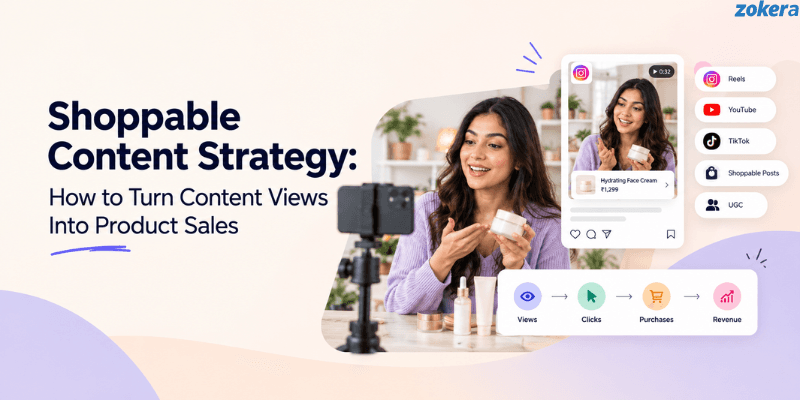
People no longer discover products only by searching for them on e-commerce websites. They find products through Instagram Reels, YouTube videos, product reviews, tutorials, comparisons, creator recommendations, and user-generated content. A shoppable content strategy connects this discovery experience with a simple path to explore and purchase the product.
The goal is not to turn every piece of content into an advertisement. Instead, shoppable content should help people understand a product, decide whether it fits their needs, and find it easily when they are ready to buy. When useful content, relevant products, and a clear purchase path work together, content views can become product clicks and eventually sales.
What Is a Shoppable Content Strategy?
A shoppable content strategy is a planned approach to creating content that helps people discover products and gives them an easy way to explore or purchase them. Reviews, tutorials, comparison videos, social posts, creator recommendations, and UGC can all become part of a shoppable content strategy.
For example, a beauty creator may create a video showing their morning skincare routine and connect the products used in the routine to a product link, collection, or storefront. Viewers can learn about the products and explore them without having to search for each one separately.
A strong shoppable content strategy generally focuses on:
Useful content: Helps the audience solve a problem or make a decision.
Relevant products: Products naturally fit the topic and audience.
Simple purchase path: Viewers can easily move from content to product details or purchase.
As social platforms and creator commerce continue to connect content discovery with shopping, creators can use features such as YouTube Shopping for creators to connect products with their content and make product discovery more actionable.
For a broader understanding of how creators connect content with product sales, what creator commerce is and how it works provides useful context.
Why Is Shoppable Content Important for Ecommerce?
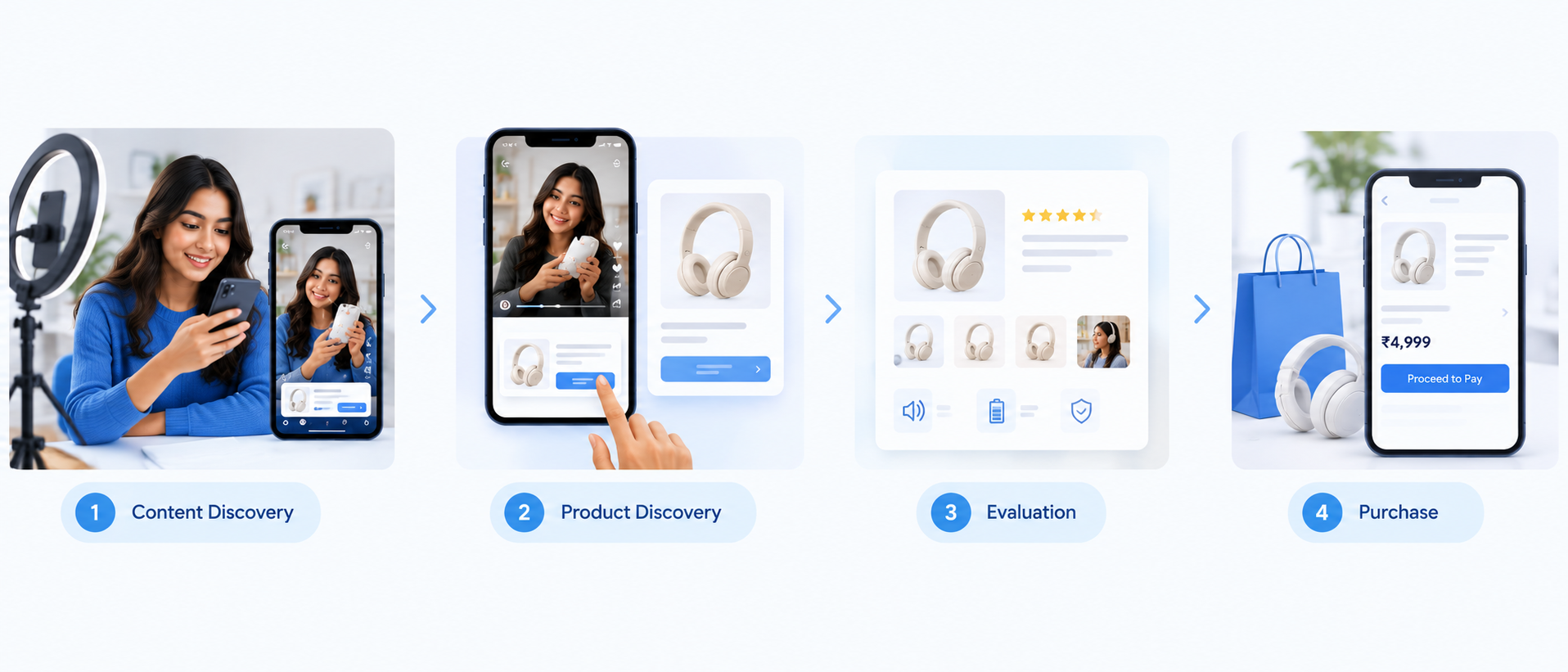
Traditional ecommerce usually starts with a product search. A customer visits an online store or marketplace, searches for a product, compares options, reads reviews, and then decides whether to buy.
Shoppable content changes where that journey begins. Instead of waiting for someone to search for a product, brands and creators can introduce it while people are already researching a problem, watching a tutorial, comparing alternatives, or looking for recommendations.
For example, someone looking for a fitness tracker might watch a creator compare two devices or demonstrate how they use one during workouts. If the content also makes the featured products easy to explore, the viewer can move from discovery to consideration without starting another search.
This creates a simpler journey:
Content → Product discovery → Evaluation → Product details → Purchase
Instead of:
Content → Search again → Find product → Compare → Purchase
This shift is also visible in creator-led shopping experiences on YouTube, where product discovery and creator content are becoming more closely connected.
Shoppable Content Also Helps Creators
Creators can use shoppable content to make product recommendations a useful part of their content rather than treating them as separate advertisements.
A creator reviewing wireless earbuds, for example, can discuss sound quality, comfort, battery life, and who the earbuds are best suited for. The product link then becomes a useful next step for viewers who want to explore the recommendation.
This works particularly well when creators recommend products that genuinely fit their audience. A creator who has already built trust around a specific niche can make product discovery feel more personal and relevant.
A creator storefront can make this process easier by giving creators one place to organize recommended products and share them with their audience. This is also how creator storefronts can help increase sales without a website.
How Does Shoppable Content Turn Views Into Sales?
Views are only the beginning. A video can generate thousands of views but very few product clicks if the audience does not have enough interest, trust, or information to continue toward a purchase.
A strong strategy therefore focuses on the complete journey from attention to action.
1. Capture Attention
The first job of shoppable content is to make people want to keep watching. A skincare creator might start by addressing a common skin concern, while a technology creator could demonstrate a problem that a particular device solves.
The product becomes part of the story rather than appearing as an advertisement immediately.
2. Create Product Interest
Once the content has captured attention, it needs to explain why the product is worth considering. Demonstrations, comparisons, personal experiences, and real-world use cases can make product information more useful.
For example, instead of simply saying that earbuds have long battery life, a creator could explain how they perform during a long commute or a full workday.
3. Build Purchase Confidence
People often need more information before buying. Useful shoppable content can answer questions such as:
Who is the product best for?
What problem does it solve?
What are its limitations?
Is it worth the price?
How does it compare with alternatives?
Being honest about limitations can strengthen the recommendation because it helps viewers make a more informed decision.
4. Make the Product Easy to Find
Even an interested viewer may leave if finding the product requires too much effort. Product links, tags, collections, and creator storefronts can reduce this friction.
The easier it is to move from content to product details, the fewer opportunities there are for the viewer to abandon the journey.
5. Measure the Result
The final step is understanding whether the content actually influenced shopping behavior. Views show reach, but product clicks, conversion rate, and revenue provide a clearer picture of commercial performance.
This is why shoppable content should be measured as a commerce channel rather than only as a social media engagement tactic.
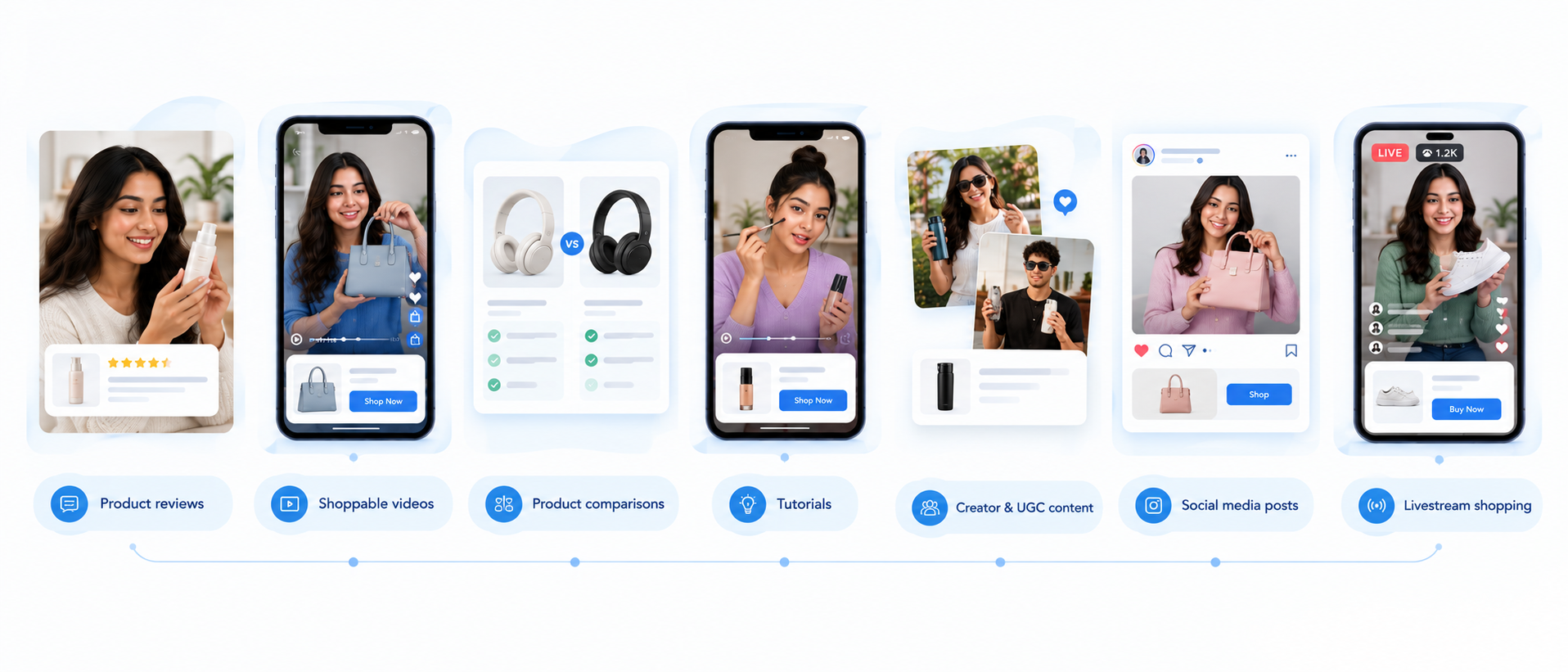
7 Types of Shoppable Content That Can Drive Product Sales
Different content formats work at different stages of the buying journey. The right format depends on the product, audience, and amount of information someone needs before purchasing.
1. Shoppable Product Reviews
Product reviews are naturally suited to shoppable content because people often search for reviews when they are already considering a purchase.
A useful review should go beyond specifications. It can explain how the product performs in real situations, what the creator likes about it, where it falls short, and who should consider buying it.
For example, a fitness creator reviewing a smartwatch could cover:
Workout tracking
Battery life
Comfort
App experience
Accuracy
Value for money
The product link then gives interested viewers a direct way to explore the recommendation.
2. Shoppable Videos
Video lets creators demonstrate products instead of simply describing them. This can be particularly effective for products where appearance, size, functionality, or actual usage affects the buying decision.
A makeup creator can demonstrate how a product looks, a technology creator can show how a device works, and a home creator can demonstrate how a product fits into a real space.
Product tagging can make this journey more direct, and YouTube Shopping product tags can help viewers move from watching content to exploring products.
3. Product Comparisons
Comparison content works well for people who are already evaluating alternatives. Searches such as “wireless earbuds A vs B” or “best smartwatch under ₹5,000” indicate a stronger level of purchase intent than general category searches.
A good comparison should explain meaningful differences rather than simply declaring a winner.
You can compare:
Price
Features
Performance
Design
Use cases
Target audience
This helps viewers understand which option is right for them while giving them a direct way to explore the products.
4. Tutorials and How-To Content
Tutorials can introduce products naturally because the product is being used to accomplish something.
A cooking creator might use a particular appliance in a recipe, while a fitness creator might demonstrate equipment during a workout. The product becomes part of the solution rather than the main sales message.
This format works best when the tutorial remains useful even for someone who is not ready to buy.
5. Creator and UGC Content
Creator and user-generated content can make products feel more relatable because viewers see them being used in real situations.
A creator might show how they use a product throughout the day, explain why they bought it, or share what they would change after using it.
The important factor is authenticity. If every creator post feels like a scripted advertisement, the recommendation can lose the trust that makes creator commerce effective.
6. Shoppable Social Media Content
Social media has become an important product discovery environment. Short videos, carousels, Stories, and creator recommendations can introduce products before people actively search for them.
Meta's research on shopping behavior in India also shows how social discovery, messaging, and commerce are becoming increasingly connected. Its research on how India shops provides further context for this shift.
The format should match the platform. A quick demonstration may work well as a short-form video, while a detailed comparison may be more suitable for a longer video or carousel.
7. Shoppable Livestreams
Livestreams combine product demonstrations, audience interaction, and shopping in one experience. Viewers can ask questions while the creator demonstrates products and explains how they work.
This can work particularly well for beauty, fashion, electronics, home products, and other categories where customers have several questions before buying.
However, the livestream still needs to provide value. Constantly pushing viewers to purchase can make the experience feel like a sales broadcast rather than useful content.
How to Build a Shoppable Content Strategy
Building a shoppable content strategy does not begin with adding product links. Start with the audience, understand what they need, and then choose the products and formats that fit that journey.
Step 1: Understand Your Audience's Buying Intent
Start by identifying what your audience is trying to achieve and where they are in the buying journey. Someone discovering a product category needs different content from someone comparing two specific products.
Look at:
Search behavior
Questions people ask
Products they discuss
Content formats they engage with
Common purchase objections
Whether they are discovering, comparing, or ready to buy
These insights help you create content around real buying intent instead of simply adding products to existing posts.
Step 2: Choose Products That Fit the Content
The product should naturally belong in the content. If you are creating a tutorial about setting up a home workout space, fitness equipment makes sense. An unrelated product can make the recommendation feel forced.
Consider:
Relevance to the topic
Audience interest
Product usefulness
Price or budget
Your actual experience with the product
Whether the product solves the problem discussed
The stronger the connection between content and product, the more natural the recommendation feels.
Step 3: Choose the Right Content Format
Different formats serve different purposes. Reviews are useful when people need confidence, comparisons work when they are choosing between alternatives, and tutorials are useful when they need to understand how a product works.
Instead of using every format, identify the formats your audience already responds to and build a repeatable content system around them.
Step 4: Create a Clear Purchase Path
Once someone becomes interested, make the next step obvious. Depending on the platform, this could be a product tag, product link, collection, storefront, or product page.
Avoid unnecessary steps. If someone has just watched a detailed review and wants to explore the product, making them search for the product name manually creates friction.
A creator storefront guide can also help explain how products can be organized into one shopping destination.
Step 5: Use Natural Calls to Action
A CTA should make sense within the content rather than interrupting it.
For example, after comparing two headphones, a creator can tell viewers where they can check both products. After a tutorial, they can direct viewers to the products used in the setup.
The goal is to make the shopping action available without allowing it to overpower the content.
Step 6: Organize Products Into Collections
Collections are useful when a creator recommends several products around one topic. Instead of sending viewers to multiple separate links, related products can be organized around a specific need.
For example, a fitness creator could create collections for:
Beginner workout equipment
Home gym essentials
Recovery products
Budget-friendly fitness products
This makes the storefront easier to browse and gives viewers a reason to explore beyond the product mentioned in a single video.
Step 7: Track What Actually Converts
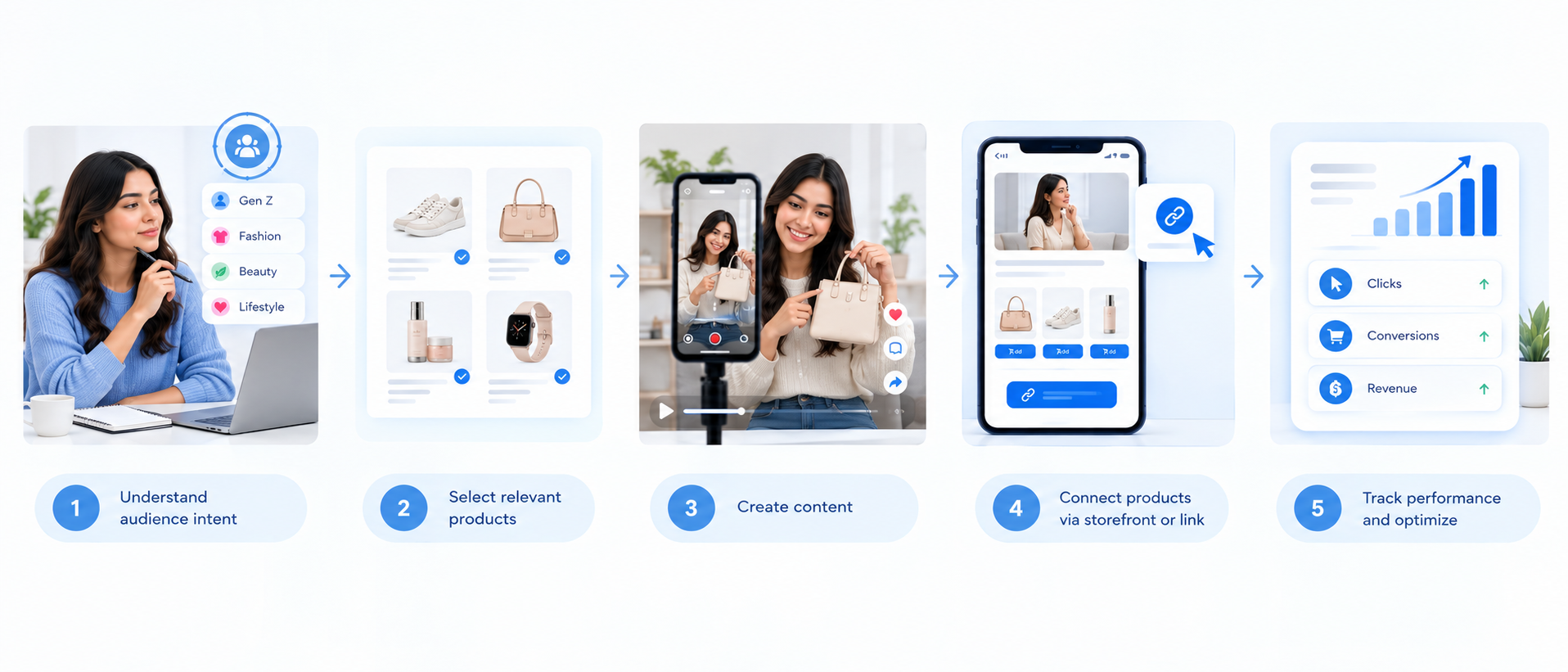
Once your content is live, track more than views. Look at which posts generate product clicks, which products attract the most interest, and which content formats generate purchases or revenue.
If comparison videos consistently generate stronger product clicks than general product posts, for example, you can create more comparison content around products your audience is already considering.
Shoppable Content Strategy for Creators
For creators, shoppable content works best when recommendations are built around experience rather than promotion. People follow creators for their opinions, expertise, personality, or perspective, so the commercial element should support that relationship.
One useful approach is to create recurring content around products you genuinely use. A series such as “Products I Actually Use” can explain why you bought each product, what you like about it, what you would change, and who should consider it.
The same product can then appear in different content formats:
An introduction or first impression
A detailed review
A tutorial or demonstration
A comparison with another product
An update after using it for several weeks
Platforms are also making creator-led commerce more accessible. For example, the YouTube Shopping affiliate program allows eligible creators to connect products with their content and earn from qualifying purchases.
Creators should also answer the questions people have before buying. Is the product worth the price? Who is it for? What are its limitations? Is there a cheaper alternative?
These questions are often more useful than simply telling an audience that a product is “amazing.” For creators exploring monetization, understanding how creators earn commission on Instagram can also help connect product recommendations with a broader content strategy.
How Zokera Fits Into a Shoppable Content Strategy
Creators do not necessarily need a website to build a simple shopping journey around their content. A creator storefront can act as a central destination where recommended products are organized and shared with an audience.
With Zokera, creators can build a storefront, organize products into collections, and share one storefront link across channels such as Instagram, YouTube, Telegram, and WhatsApp.
For example, a creator could publish a Reel about useful products for a college setup and direct interested viewers to a relevant collection. Another creator could create a YouTube video about affordable skincare and organize the recommended products in a skincare collection.
Zokera also provides shopping-focused features such as Auto-DM, which can help creators share relevant storefront or product links when their audience asks for them.
The basic flow is straightforward:
Content creates interest → Storefront organizes products → Viewer explores products → Purchase can happen
Creators who want to understand the platform in more detail can start with this beginner's guide to earning on Zokera.
Shoppable Content Metrics You Should Track
A shoppable content strategy should be measured across the entire customer journey. Views are useful for understanding reach, but they do not show whether people became interested in a product, clicked through, or completed a purchase. Tracking metrics at each stage helps identify where the content is working and where the buying journey needs improvement.
1. Views and Reach
Views show how many people consumed your content and help measure overall reach. However, high views do not automatically mean strong commercial performance.
For example, a video with 100,000 views and very few product clicks may be less valuable from a sales perspective than a targeted video with 10,000 views and strong product engagement.
2. Product Click-Through Rate
Product CTR shows how effectively content turns attention into product interest.
Product CTR = Product clicks ÷ Content views × 100
For example, if a video receives 10,000 views and 300 people click the featured product, the product CTR is 3%.
A low CTR can indicate that the product is not relevant enough to the audience, the call to action is unclear, or the content has not created enough purchase interest.
3. Conversion Rate
Conversion rate measures how many people who clicked on a product eventually completed a purchase.
Conversion Rate = Purchases ÷ Product clicks × 100
For example, if 300 people click a product and 15 make a purchase, the conversion rate is 5%.
A high product CTR combined with a low conversion rate can indicate that people are interested in the product but encounter friction later in the purchase journey, such as pricing, product information, trust, or checkout issues.
4. Revenue Per Content Piece
Revenue per content piece helps compare the commercial value of different posts, videos, reviews, or campaigns.
One video may generate significantly more views while another receives fewer views but produces more sales. Looking at revenue helps identify which content contributes more directly to business results rather than judging performance only by reach.
5. Product-Level Performance
Not every product will perform equally well. Track which products receive the most clicks, generate the most purchases, and consistently perform across different pieces of content.
These insights can help you identify what your audience actually wants and which products deserve more visibility. For creators using storefronts, this type of analysis can also help improve how products are organized and promoted. A digital storefront for creators in India can provide a central place to organize recommended products and connect them with creator content.
Common Shoppable Content Strategy Mistakes
Even a strong shopping setup can perform poorly when the content itself does not provide enough value.
1. Making Every Post a Sales Pitch
If every post asks people to buy something, the audience can quickly become resistant to the commercial message. Educational posts, comparisons, tutorials, and experiences can create demand without constantly asking for a purchase.
2. Promoting Irrelevant Products
A product should make sense within the context of the content. Irrelevant recommendations can reduce both engagement and trust.
Before adding a product, ask whether it genuinely helps solve the problem being discussed.
3. Giving Too Many Choices
More products do not always mean more sales. Dozens of similar options can make the decision harder.
Curated collections and clear recommendations can be more useful than displaying everything available.
4. Focusing Only on Views
Views are useful, but they are only one part of the funnel. Track product clicks, CTR, conversions, and revenue alongside reach to understand the complete performance.
5. Making the Purchase Path Difficult
A viewer should not have to search through several pages to find a product mentioned in a video. Every unnecessary step creates another opportunity for the viewer to leave.
6. Ignoring Content Quality
Adding shopping features cannot compensate for weak content. If a review is shallow, a tutorial is confusing, or a recommendation feels dishonest, a product link will not solve the underlying problem.
How to Create Content That Sells Without Feeling Salesy
The simplest rule for shoppable content is help first, sell second.
Before adding a product, ask whether it genuinely helps solve the problem being discussed. If it does, explain why it is useful, show how it works, and give enough information for the viewer to decide whether it fits their needs.
A good shoppable content piece should help viewers answer questions such as:
Is this product right for me?
What problem does it solve?
How does it work in real life?
What are its limitations?
Are there better alternatives?
Where can I explore or buy it?
The purchase path should then appear as the logical next step. If someone has watched the content and decided that the product is worth exploring, they should be able to find it without unnecessary effort.
This creates a better balance between content and commerce. The content earns attention and trust, while the shopping experience makes that interest actionable.
Shoppable Content vs Traditional Content Marketing
Shoppable content and traditional content marketing are not opposites. Both can educate, inform, entertain, and build trust, but shoppable content creates a stronger connection between the content experience and the product journey.
Factor | Traditional Content Marketing | Shoppable Content |
|---|---|---|
Main goal | Educate, attract, inform, or build awareness | Educate while creating a path toward product discovery and purchase |
Product connection | May be indirect | Directly connected to the content |
Purchase path | Usually requires another step | Can be integrated into the content experience |
Common formats | Blogs, guides, videos, social posts | Reviews, tutorials, videos, UGC, comparisons, livestreams |
Main metrics | Traffic, engagement, rankings, reach | Product clicks, CTR, conversions, revenue |
Best use | Building awareness and consideration | Connecting discovery and consideration with commerce |
A brand does not have to choose one approach exclusively. Educational content can create awareness and trust, while shoppable formats can help people move further through the buying journey when product intent becomes stronger.
Shoppable Content Examples by Content Type
The easiest way to understand a shoppable content strategy is to see how different formats can connect content with products.
Content Type | Example Topic | Suitable Purchase Path |
|---|---|---|
Product review | Is this fitness tracker worth buying? | Product link or storefront |
Tutorial | How to build a beginner home gym | Product collection |
Comparison | Wireless earbuds A vs B | Individual product links |
Product demo | How this kitchen appliance works | Product page or storefront |
Creator recommendation | Products I use every day | Creator storefront |
UGC | How I use this product at home | Product link |
Short-form video | 3 useful products for college students | Product collection |
Livestream | Live product demonstration and Q&A | Product tags or shopping destination |
The strongest examples have one thing in common: the product is relevant to the content. The shopping element does not feel like something added after the content was created. It is part of the experience from the beginning.
Conclusion
A strong shoppable content strategy is not about adding a product link to every post. It is about creating useful content that helps people discover, evaluate, and confidently choose relevant products. When reviews, tutorials, videos, social posts, and creator recommendations are connected to a simple purchase path, content can move users naturally from discovery to product clicks and sales.
For creators and brands, the key is to focus on relevance, trust, and measurable results. Choose products that genuinely fit the content, make them easy to find, use natural calls to action, and track clicks, conversions, and revenue instead of focusing only on views. As social commerce and creator commerce continue to grow, a well-planned shoppable content strategy can turn everyday content into a stronger and more measurable sales channel.
FAQs About Shoppable Content Strategy
1. What is a shoppable content strategy?
A shoppable content strategy is an approach to creating content that helps people discover, evaluate, and purchase relevant products. It connects useful content such as reviews, tutorials, videos, comparisons, and creator recommendations with a clear shopping path.
2. How does shoppable content increase sales?
Shoppable content can reduce friction between product discovery and purchase. Instead of requiring viewers to remember a product name and search for it later, the content can provide a direct way to explore the product when interest is highest.
3. What types of content can be made shoppable?
Product reviews, demonstrations, tutorials, comparisons, creator recommendations, UGC, social media videos, and livestreams can all support shoppable experiences. The most suitable format depends on the product and the audience's buying intent.
4. Is shoppable content only for ecommerce brands?
No. Creators, publishers, retailers, and brands can all use shoppable content when they recommend or feature products. Creators can use product links, affiliate programs, collections, or storefronts to connect their content with product discovery.
5. What metrics should creators track?
Creators should look beyond views and track product clicks, product click-through rate, conversion rate, revenue, and product-level performance. These metrics help show whether content is actually contributing to shopping activity.
6. Is shoppable content the same as affiliate marketing?
They overlap, but they are not exactly the same. Affiliate marketing is a monetization model where a creator or publisher can earn a commission from qualifying purchases, while shoppable content is a broader content strategy that connects product discovery and content with a purchase path.
Comments (0)
Be the first to comment.