
.png&w=3840&q=75)
Most people waste 3–5 hours daily on tasks AI can finish in minutes. If you're still doing everything manually, you're already behind in 2026. Writing emails, designing graphics, doing research, and organizing notes can now be done faster and smarter. Using the right AI tools to boost your productivity in 2026 ensures you stay ahead without needing to be a tech person.
In today's fast-moving world, free AI tools have become essential. Whether you are a student, a working professional, or a small business owner, here are 5 tools that will genuinely simplify your life.
What are AI tools and why should you use them?
What are AI tools?
AI tools are software applications that use artificial intelligence to help users complete tasks like writing, designing, researching, and productivity faster and more efficiently.
AI tools are smart software programs that use artificial intelligence to help you do things faster and better. Think of them as a helpful assistant that is available 24 hours a day, never gets tired, and never asks for a salary.
You can use AI tools to:
Save hours on tasks that used to take forever
Create better work even if you have no special skills
Stay organized, focused, and productive every single day
Learn new things quickly without reading through long books
You do not need to be a tech expert to use any of these tools. If you can use WhatsApp, you can use AI tools. Let's get into it.
Top 5 Free AI Tools for Productivity and Creativity
1. Notion AI

Do you ever feel like your to-do list is out of control? Or that you have too many ideas floating around in your head and no way to organise them? Notion AI is the answer to that problem.
What does it do?
Notion AI is a free productivity app that helps you organise your entire life in one place. Here is what it can do for you:
Create daily to-do lists and weekly planners in seconds
Summarise long documents and notes with one click
Set reminders, track goals, and manage projects easily
Use the AI to draft emails, meeting notes, and action plans
How to use it
Step 1: Go to notion.so and sign up for free
Step 2: Create a new page for your tasks or goals
Step 3: Press the spacebar to activate the AI assistant
Step 4: Ask it to help you plan your day, summarise notes, or draft anything
Step 5: Use it every day to stay on top of your life
Why people love it
This tool keeps everything in one place across mobile and desktop, offering a generous free plan that eliminates scattered notes and fits any budget.
2. Canva AI
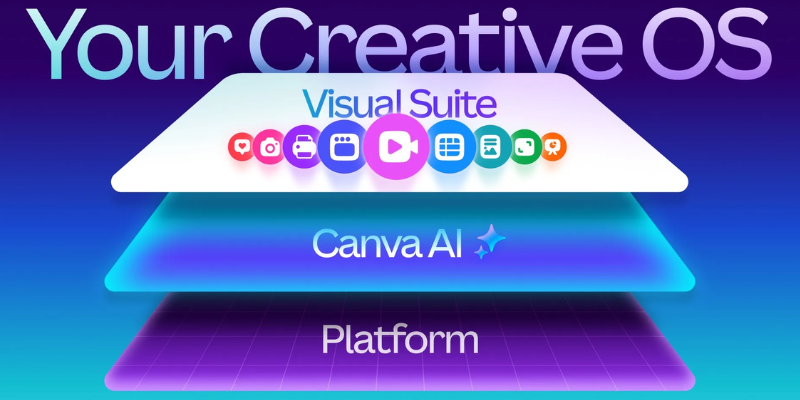
You do not need to be a designer to create beautiful visuals anymore. Canva's AI features have made it possible for absolutely anyone to design stunning images, posters, social media posts, and much more, completely for free.
What does it do?
Canva AI is a free design tool that lets you create professional-looking visuals with almost no effort. It can:
Generate images from text using its AI image generator
Remove backgrounds from photos in just one click
Design social media posts, flyers, CVs, and presentations
Suggest design layouts and color combinations automatically
How to use it
Step 1: Go to canva.com and sign up for a free account
Step 2: Choose what you want to create (post, poster, CV, etc.)
Step 3: Pick a template or start from scratch
Step 4: Use the AI tools to generate images or edit your design
Step 5: Download your design for free in seconds
Why people love it
With no design skills needed, anyone can use these thousands of free templates to create professional results in minutes for any situation.
3. ChatGPT

Whether you need to write an email, draft a message, create a caption, or just put your thoughts into words, ChatGPT makes it incredibly easy. It is probably the most well-known AI tool in the world right now, and it is free to use.
What does it do?
ChatGPT is an AI chatbot made by OpenAI. You just type what you need, and it responds like a smart, helpful person. Here is what it can help you with:
Writing emails, messages, and letters quickly and clearly
Creating captions and posts for social media
Translating text into different languages
Fixing grammar mistakes and improving your writing
Answering questions and helping you think through ideas
How to use it
Step 1: Go to chat.openai.com and create a free account
Step 2: Type what you need help with in simple words
Step 3: Read the response and ask follow-up questions if needed
Step 4: Copy, edit, and use the output however you like
Why people love it
Using this tool feels like texting a smart friend who knows everything, and it works for any task, from writing and planning to learning, with a free version powerful enough for everyday use.
4. Perplexity AI

We all need to look things up every day. But typing into Google and then reading through ten different websites is slow and tiring. Perplexity AI fixes this problem completely. It searches the web for you and gives you one clear, simple answer with sources included.
What does it do?
Perplexity AI is like a smarter version of Google. Instead of showing you links, it reads them for you and gives you a direct answer. It can help you:
Get fast, accurate answers to any question you have
Research any topic with real sources and citations
Learn about complex topics explained in simple language
Stay updated on current news and events in real time
How to use it
Step 1: Go to perplexity.ai (no sign up needed to start)
Step 2: Type your question just like you would on Google
Step 3: Get a clear answer with sources listed below
Step 4: Ask follow-up questions to go deeper into the topic
Why people love it
This tool provides one clear answer that saves time without needing ten open tabs, while always showing sources so students and professionals can easily verify every detail.
5. Grammarly
We all write emails, messages, applications, and captions. But not everyone is confident about their writing. Grammarly is like having a personal editor who checks everything you write and makes sure it sounds great.
What does it do?
Grammarly checks your writing in real time and helps you fix it instantly. It catches:
Spelling and grammar mistakes
Sentences that are too long or hard to read
Words that can be replaced with simpler, clearer ones
The tone of your writing should sound right for the situation
How to use it
Step 1: Go to grammarly.com and sign up for free
Step 2: Install the free browser extension
Step 3: Start typing anywhere online, and it checks automatically
Step 4: Accept suggestions that improve your writing and ignore the rest
Why people love it
This tool works everywhere from Gmail and Google Docs to WhatsApp Web, giving you the confidence to write professionally with a free version that handles most everyday needs perfectly.
ALSO READ: Generative AI 2.0: How Content Creation Has Transformed in 2026
Free vs Paid Comparison
| Tool | Free Plan | Paid Adds |
|---|---|---|
| Notion AI | Basic AI, unlimited pages | Unlimited AI, team features |
| Canva AI | Templates, basic AI tools | Premium templates, unlimited AI images |
| ChatGPT | Standard responses | GPT-4o, image generation |
| Perplexity AI | Unlimited searches, citations | More AI models, file uploads |
| Grammarly | Grammar and spelling checks | Plagiarism checker, full rewrites |
Start with the free plan, it is more than enough for beginners.
How to Choose the Right Tool
Not sure where to start? Simply pick the tool that solves your biggest daily problem.
| Your Problem | Best Tool |
|---|---|
| Too many tasks, no organisation | Notion AI |
| Need designs but no skills | Canva AI |
| Struggle with writing | ChatGPT |
| Spend too much time researching | Perplexity AI |
| Want error-free, professional writing | Grammarly |
Start with one tool, use it for a week, then add the next. You do not need all five at once.
Conclusion
AI tools are not the future; they are the present. And the best part is, you do not need to spend a single rupee to start using them.
Whether you want to stay organised, design better, write faster, research smarter, or just sound more professional, there is a free tool on this list for you.
Start small. Pick one tool today, try it for a week, and see the difference it makes. Once you do, you will wonder how you ever managed without it.
ALSO READ: The Future of AI in 2026: Top 5 Smart Gadgets That Will Change Your Life
Best AI Tools for Students (Free + Paid) – 2026 Guide
Free AI Certification Courses for Students in India
How to Create a YouTube Script Using AI Tools
Top 5 Free AI Tools That Help You Make Money Online
FAQs — AI tools to boost your productivity in 2026
Q1. What is the best free AI tool for beginners?
ChatGPT is the best starting point for beginners. It is easy to use, works for almost any task, and the free version is powerful enough for everyday use.
Q2. Which free AI tool is best for students?
Perplexity AI is great for students as it gives fast, accurate answers with real sources, perfect for research and assignments.
Q3. Can I use AI tools without creating an account?
Yes, Perplexity AI lets you start searching without signing up. However, tools like Notion AI, Canva, and Grammarly require a free account to access all features.
Q4. Is Canva AI completely free?
Canva has a free plan that includes thousands of templates and basic AI features. Some premium templates and advanced AI tools require a paid plan.
Q5. What is the difference between ChatGPT free and paid?
The free version gives you access to standard AI responses. The paid version unlocks faster responses, GPT-4o, image generation, and file uploads.
Q6. Are AI tools safe for personal use?
Yes, all the tools in this list are from trusted companies. Just avoid sharing sensitive information like passwords or bank details with any AI tool.
Q7. Can AI tools work in Hindi or other languages?
Yes, ChatGPT, Grammarly, Canva, and Perplexity AI all support multiple languages, including Hindi.
Comments (0)
Be the first to comment.