
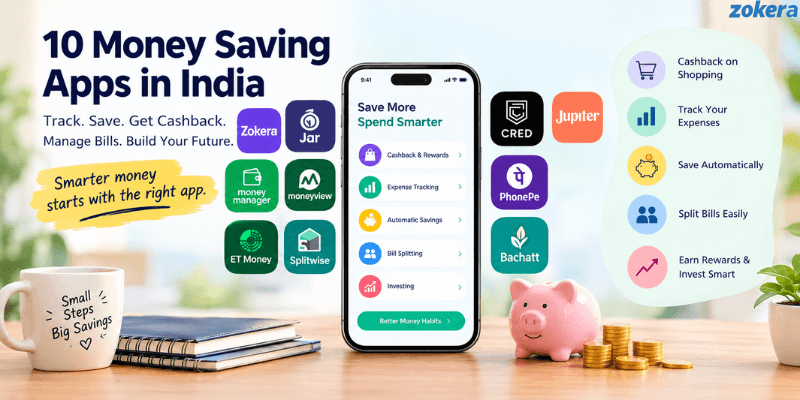
You check your bank statement at the end of the month and wonder where your money went. Online shopping, recurring bills, subscriptions, and small daily payments can quietly add up. The right money-saving apps in India can help you manage these expenses through shopping cashback, expense tracking, automatic savings, bill splitting, and payment rewards.
This guide compares 10 money saving apps in India, starting with Zokera, and explains their key features, benefits, and limitations. Whether you want to save on planned purchases, track monthly spending, or build a regular saving habit, you will learn which apps fit your needs and how to choose two or three without cluttering your phone.
App | What It Can Help Reduce or Manage | Best For |
|---|---|---|
Zokera | Cost of eligible online purchases | Shopping cashback |
Jar | Manual effort of saving | Automatic digital gold savings |
Money Manager | Untracked small spends | Manual expense tracking |
Moneyview | Untracked expenses | Automatic expense tracking |
ET Money | Irregular investing | Goal based mutual fund investing |
Splitwise | Shared expenses | Bill splitting |
CRED | Credit card related costs | Bill management and rewards |
Jupiter | Everyday spending | UPI and payment rewards |
PhonePe | Bill and recharge costs | Payments and offers |
Bachatt | Irregular saving habits | Small regular investments |
How Money Saving Apps Can Reduce Monthly Expenses
Money saving apps generally help in four ways: they show where your money is going, make saving more automatic, reduce the cost of eligible purchases, or make shared expenses easier to divide.
The important distinction is that an app does not automatically make something cheaper. A cashback app can reduce the effective cost of an eligible purchase, while an expense tracker can help you identify spending that you may want to cut.
1. Track and control spending
Expense tracking can show how much you spend on categories such as food, shopping, transport, subscriptions, and bills. Once you can see recurring spending clearly, it becomes easier to set limits.
2. Reduce shopping costs
Cashback and reward apps can return part of the eligible purchase value or provide rewards and offers. This is particularly useful for purchases you were already planning to make.
3. Automate savings
Some apps use automatic saving rules or scheduled contributions so that money moves toward a savings or investment goal before you spend it elsewhere.
For readers interested in starting investments through apps, Zokera also covers investment apps in India for beginners.
4. Manage shared expenses
Bill splitting tools can help roommates, couples, friends, and travel groups keep track of who paid what. This reduces forgotten reimbursements and unnecessary duplicate payments.
10 Money Saving Apps in India
1. Zokera

Zokera is best for reducing the effective cost of eligible online shopping through cashback.
Zokera is a creator commerce platform that connects creators, brands, and shoppers. It has 1100+ brand partnerships, and eligible shopping purchases can provide cashback to shoppers. Followers can also receive cashback on eligible purchases made through creator storefronts, such as a shoppable Instagram storefront.
For a wider look at cashback and rewards, see Zokera's guide to shopping reward apps in India.
This makes Zokera different from a tracker. It does not show where your budget went. It can reduce what you effectively pay when you shop through eligible Zokera journeys.
Why it matters
It applies to purchases you already planned to make.
Brand partnerships span categories such as fashion, beauty, electronics, fitness, and lifestyle.
Followers can use creator storefronts as a route to cashback on eligible purchases.
Key points
1100+ brand partnerships
Cashback on eligible shopping purchases
Follower cashback on eligible creator storefront purchases
Keep in mind: Cashback rates, eligible products, and offer conditions vary, so read the offer terms before you pay. Cashback helps only on things you were going to buy anyway.
Best for: People who shop online regularly and want cashback on eligible purchases.
2. Jar

Jar is best for people who want to set money aside in small amounts without doing it manually each time.
Jar focuses on saving through digital gold. Its current product information says you can buy digital gold from ₹10 and use an auto-save feature that rounds up spending into gold. It is a way to set money aside automatically, but it is an investment product, not a bank savings account.
If you want to understand how different investment apps work before choosing one, you can also read Zokera's guide to investment apps in India for beginners.
Why it matters
Small amounts can be set aside automatically.
A daily savings goal can be set.
Digital gold can be bought and sold in the app.
Key points
Digital gold from ₹10
Auto save through round-ups
Gold price-linked value
Keep in mind: The value of digital gold moves with gold prices and can fall as well as rise. Returns and savings are not guaranteed.
Best for: People who prefer small automated contributions and understand that digital gold carries price risk.
3. Money Manager (Realbyte)
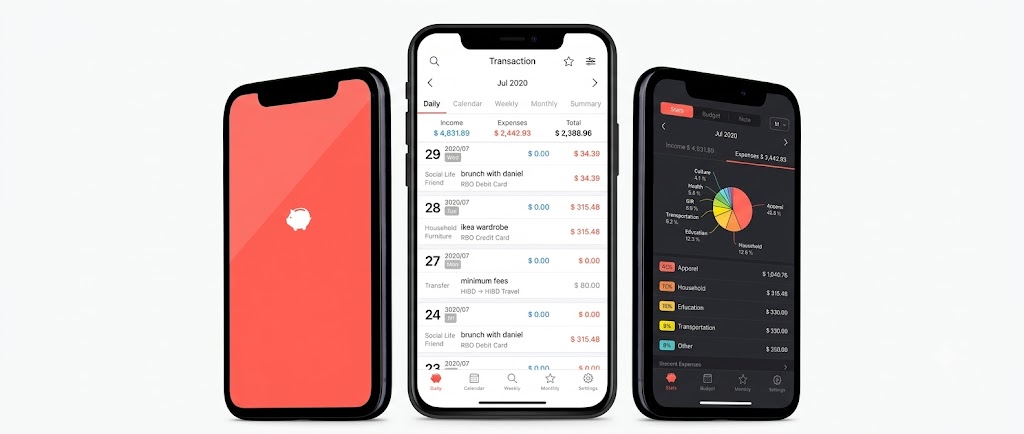
Money Manager is best for people who want to log and budget spending by hand, with full control over what goes in.
Money Manager by Realbyte is a budget and expense tracker built around manual entry. Its app store listing describes weekly, monthly, and annual budget planning, graphs that compare spending against your budget, passcode protection, and scheduled transfers. Money Manager is free to download, while some features may require a paid subscription. Check the current pricing in the app store.
Why it matters
You can record each expense by category.
Budget against spending graphs can show where spending is above plan.
Passcode protection is available.
Key points
Weekly, monthly and annual budgets
Spending graphs by category
Manual entry
Keep in mind: Manual entry works only if you log expenses regularly. Check the permissions and publisher details on the version you install.
Best for: People who prefer typing in their own numbers over granting automatic tracking access.
4. Moneyview

Moneyview is best for people who need a clearer picture of where their money goes each month.
Moneyview's Money Manager feature tracks expenses, manages budgets, categorizes spending, and monitors transactions. Its current app information says transaction data can be captured from bank and bill related SMS, so you do not have to enter every expense yourself.
Why it matters
Automatic capture reduces manual entry.
Category totals can help you spot spending you may want to reduce.
Budgets give you a monthly limit to check against.
Key points
Expense tracking and budgets
Spending categories
SMS based transaction capture
Keep in mind: SMS based tracking needs permission to read financial messages. Review what you are granting and whether you are comfortable with the data handling.
Best for: People who regularly lose track of small monthly expenses.
5. ET Money

ET Money is best for people who want to automate regular mutual fund investing alongside expense tracking.
ET Money offers mutual fund investments and tools such as SIPs. Its educational material explains that a SIP invests a fixed amount at regular intervals through automated bank debits. It also has an Expense Manager, and its help documentation explains how expenses are tracked and whether transaction information comes from SMS.
If you are comparing regular investing with investing a larger amount at once, Zokera's guide to SIP vs lump sum investment in India explains the two approaches in more detail.
Investing is different from saving: it does not reduce this month's expenses.
Why it matters
SIPs automate regular contributions.
Expense tracking sits next to your investing.
Goal oriented investing options are available.
Key points
Mutual fund investments and SIPs
Expense Manager
Market linked returns
Keep in mind: Mutual fund values can fall as well as rise, and returns are not guaranteed. Read the SEBI Investor Website education material before you start.
Best for: People who have money left over after essential expenses and are comfortable with market risk.
6. Splitwise

Splitwise is best for controlling shared expenses between friends, roommates, couples, or travel groups.
Splitwise records shared expenses and shows who owes whom. Its official description includes shared vacations, rent with roommates, meals, and repayments between friends. It does not make a bill cheaper. It can reduce the chance of quietly absorbing costs that were meant to be shared.
Why it matters
Shared expenses can be recorded when they happen.
Everyone can see their outstanding balance.
It can reduce forgotten reimbursements.
Key points
Group and one to one expenses
IOU tracking
Useful for travel and shared households
Keep in mind: It works best when everyone in the group records expenses consistently.
Best for: Roommates, couples, friends, and groups that regularly share costs.
7. CRED

CRED is best for eligible users who want to manage credit card bills and access available rewards.
CRED lets eligible members manage multiple credit cards, track spending, get bill reminders, and earn rewards for eligible activity. Its terms also cover credit card bill payments, CRED Coins, and limited time cashback offers. In June 2026, CRED introduced multibill payment and autopay for credit card bills.
If you regularly use credit cards for shopping, Zokera also has a guide covering cashback credit cards in India, including how cashback structures and spending categories work.
Why it matters
Several card bills can be managed in one place.
Autopay can help avoid missed due dates.
Eligible users can receive rewards under applicable programmes.
Key points
Multiple card tracking and reminders
Autopay and multibill payment
Rewards and limited-time offers
Keep in mind: Rewards and eligibility change, so check the current terms in the app before assuming a reward amount. Check your card's charges and interest before relying on rewards.
Best for: Eligible credit card users who manage more than one card.
8. Jupiter

Jupiter is best for people who want payment rewards and spending tools in one financial app.
Jupiter offers UPI and banking features along with rewards. Its official pages describe rewards on eligible payments, including UPI and debit card spending. The benefit comes from rewards on spending you already do, not from reducing that spending.
For a broader look at how UPI rewards work, see Zokera's guide to UPI cashback offers in India.
Why it matters
Eligible everyday payments can earn rewards.
UPI and banking sit in one app.
Rewards can offset part of eligible spending.
Key points
UPI payments and a savings account
Payment rewards
Spending and financial tools
Keep in mind: Reward structure and eligibility can change, so check what applies to your account today.
Best for: People who make frequent digital payments and want to check available rewards.
9. PhonePe
PhonePe is best for managing recurring bills, recharges, and everyday digital payments in one place.
PhonePe supports bill and recharge categories including mobile, DTH, electricity, LPG, broadband, insurance, credit card bills, FASTag and municipal taxes. The saving opportunity comes from eligible offers and rewards, not from the payment itself.
For more information on how UPI cashback and rewards can work across payment apps, see this UPI cashback offers guide.
Why it matters
Many recurring bills can be paid from one app.
Eligible recharge and bill offers may reduce costs.
Transaction history makes past payments easy to review.
Key points
UPI payments and recharges
Utility, credit card and FASTag payments
Rewards and offers
Keep in mind: Offers are often time limited. Do not buy something only because a reward is shown. Compare the final payable amount and the offer terms.
Best for: People who want one app for regular bills and recharges.
10. Bachatt

Bachatt is best for people who want to start small, regular mutual fund investments.
Bachatt offers mutual funds, Insta Fund, and gold and silver funds. Its website says you can start with ₹100 and set daily, weekly, monthly or one time contributions. It identifies Trusave Fintech Private Limited as an AMFI registered mutual fund distributor, and you can verify any distributor through AMFI's Locate a Mutual Fund Distributor tool. Bachatt describes itself as a distributor of regular mutual fund plans.
For readers comparing investment options, Zokera's guide to investment apps in India for beginners provides additional context on different investment platforms.
Why it matters
The starting amount is small.
Contribution schedules can be daily, weekly, monthly, or one time.
Different fund types are available.
Key points
Starts from ₹100
Mutual funds, gold and silver funds, Insta Fund
AMFI registered mutual fund distributor
Keep in mind: Insta Fund is described as a liquid debt mutual fund, not a bank fixed deposit. Returns are market linked and not guaranteed, and past performance does not guarantee future returns.
Best for: People who want to begin small regular investing and understand the risks.
Which App Fits Which Money Saving Goal?
Your Goal | App Type to Consider | Relevant App |
|---|---|---|
Save on eligible online shopping | Cashback | Zokera |
Set money aside automatically | Digital gold round ups | Jar |
Track spending by hand | Manual expense tracker | Money Manager |
Track spending automatically | Expense tracker | Moneyview |
Invest regularly | Mutual fund SIP | ET Money |
Split rent or group bills | Bill splitting | Splitwise |
Manage credit card bills | Bill management and rewards | CRED |
Earn rewards on payments | Payment rewards | Jupiter |
Manage recharges and bills | Payment and bill management | PhonePe |
Start small regular investing | Mutual funds | Bachatt |
Jar, ET Money and Bachatt put money into investment products such as digital gold or mutual funds, which carry market risk. Use them for goals, not as a way to cut this month's expenses.
The simplest approach is to choose based on the expense problem you actually have. Someone who overspends on shopping needs a different tool from someone who cannot track food and transport expenses.
Is It Safe? Permissions, Regulation and Fraud Checks
Money saving apps can be useful, but users should check permissions, data practices, regulatory status, and payment security before connecting financial accounts.
Check permissions, privacy policy and publisher
Some finance apps can use SMS or email information to identify transactions. Moneyview's current app listing describes SMS based expense tracking, while CRED says that CRED Protect can access financial information from linked email accounts when the user provides consent.
Before installing or connecting an account:
Check which permissions the app asks for and whether you need them.
Read the privacy policy for how your data is stored and shared.
Confirm the publisher name in the official app store listing.
Understand consent based data sharing
Some financial apps use consent based data sharing, such as India's Account Aggregator framework. The Department of Financial Services' Account Aggregator framework page states that no financial information is retrieved, shared or transferred under that framework without the customer's explicit consent.
Do not assume an app uses it. Check the data connection method of the specific app.
Check regulatory information
If an app offers investment products, loans or insurance, check which regulated entity provides the product and what role the app plays.
For mutual funds, you can confirm a distributor's registration through AMFI's Locate a Mutual Fund Distributor tool, and learn the basics on the SEBI Investor Website.
You can also read Zokera's guide to tax saving investments in India if tax planning is part of your broader financial goals. Tax rules and eligibility can change, so verify the latest provisions before making decisions.
Be careful with fraud and fake apps
Never install a financial app from an unknown APK or unofficial website because someone promises higher cashback or guaranteed returns.
If you lose money to online financial fraud, call the 1930 helpline and file a complaint on the National Cyber Crime Reporting Portal, because faster reporting improves the chance of action.
A 30 Day Setup Plan: Pick 2 or 3 Apps, Not 10
You do not need ten finance apps to save money. Too many apps can make your financial routine harder to manage.
Days 1 to 7: Find the biggest leaks
Choose one expense tracking tool and record your major spending categories.
Look at:
Food and delivery
Online shopping
Transport
Subscriptions
Bills
Impulse purchases
Do not try to cut everything at once.
Days 8 to 14: Pick one saving mechanism
Choose one tool based on your biggest problem.
If shopping is the issue, consider a cashback tool such as Zokera and check the offer terms for items you already planned to buy.
If setting money aside is the issue, consider an automatic option such as Jar, keeping in mind that digital gold is an investment product.
If shared expenses are creating confusion, use Splitwise.
Days 15 to 21: Automate one habit
Set one realistic recurring action.
For example, you could create a regular saving contribution, activate an eligible bill autopay feature, or start checking cashback before planned purchases.
Days 22 to 30: Review the results
Compare your spending with the first week.
Ask:
Did my shopping expenses fall?
Did I set anything aside automatically?
Did I identify unnecessary subscriptions?
Did I recover any eligible cashback?
Did I miss any bill payments?
Am I using too many apps?
Keep the tools that actually help and remove the ones you do not use.
Common Mistakes When Using Money Saving Apps
1. Installing too many apps
More apps do not automatically mean more savings. Two useful apps are often easier to manage than ten.
2. Buying something only because of cashback
A ₹500 cashback does not save money if you spent ₹5,000 on something you did not need.
3. Ignoring fees and terms
Always check minimum transaction values, eligibility conditions, expiry dates, withdrawal rules, and applicable fees.
4. Treating investments as guaranteed savings
Mutual funds, digital gold, and other investment products have different risks. They should not be described as guaranteed ways to save money.
5. Giving unnecessary permissions
Review SMS, email, contacts, location, and financial account permissions before granting access.
6. Forgetting to compare the final price
A cashback offer is useful only when the final transaction makes sense. Compare the actual price, delivery charges, convenience fees, and cashback conditions before paying.
Conclusion
Money saving apps in India help with different parts of your monthly finances. Zokera offers cashback on eligible shopping, Moneyview and Money Manager help you track expenses, Splitwise manages shared bills, and CRED helps eligible users manage card payments and rewards. Jar, ET Money, and Bachatt focus on automatic saving and investing, which carries market risk.
You do not need all ten. Find the expense that hurts your monthly budget most, choose one relevant tool, and review the results after 30 days.
Note: This article is for general information only and is not financial advice. Financial products, rewards, fees, eligibility requirements, and app features can change. Check the current terms before making financial decisions.
FAQs About Money Saving Apps in India
1. Which is the best free money saving app in India?
There is no single option that suits every financial need. Moneyview and Money Manager suit tracking, Zokera suits shopping cashback, and Jar suits small automatic savings. Check each app's current pricing, because some features may require a paid subscription.
2. Are money saving apps safe?
Safety depends on the specific app, permissions, data practices, and financial products involved. Check official app information, privacy policies, publisher details, regulatory information, and permissions before connecting financial data.
3. Can apps really reduce monthly expenses?
Yes, but they do so in different ways. Cashback can reduce the effective cost of eligible purchases, while expense trackers can help identify spending that you may want to cut.
4. How much can I save in a month with these apps?
There is no fixed amount. Your savings depend on your spending, the offers you qualify for, how consistently you use the apps, and whether they change your spending behaviour.
5. Do I need more than one money saving app?
Not necessarily. Start with one or two apps that solve your biggest problems. Add another only when it provides a clear benefit that your existing tools do not.
6. Which app is useful for students or people with irregular income?
A simple expense tracker can help first because irregular income makes budgeting more important. Students may also benefit from cashback on purchases they already planned to make.
Comments (0)
Be the first to comment.